Skip to content
Features · Today

Your day, measured against your normal.

What you see in the Today tab, how Aellic works out your normal and where the numbers come from.

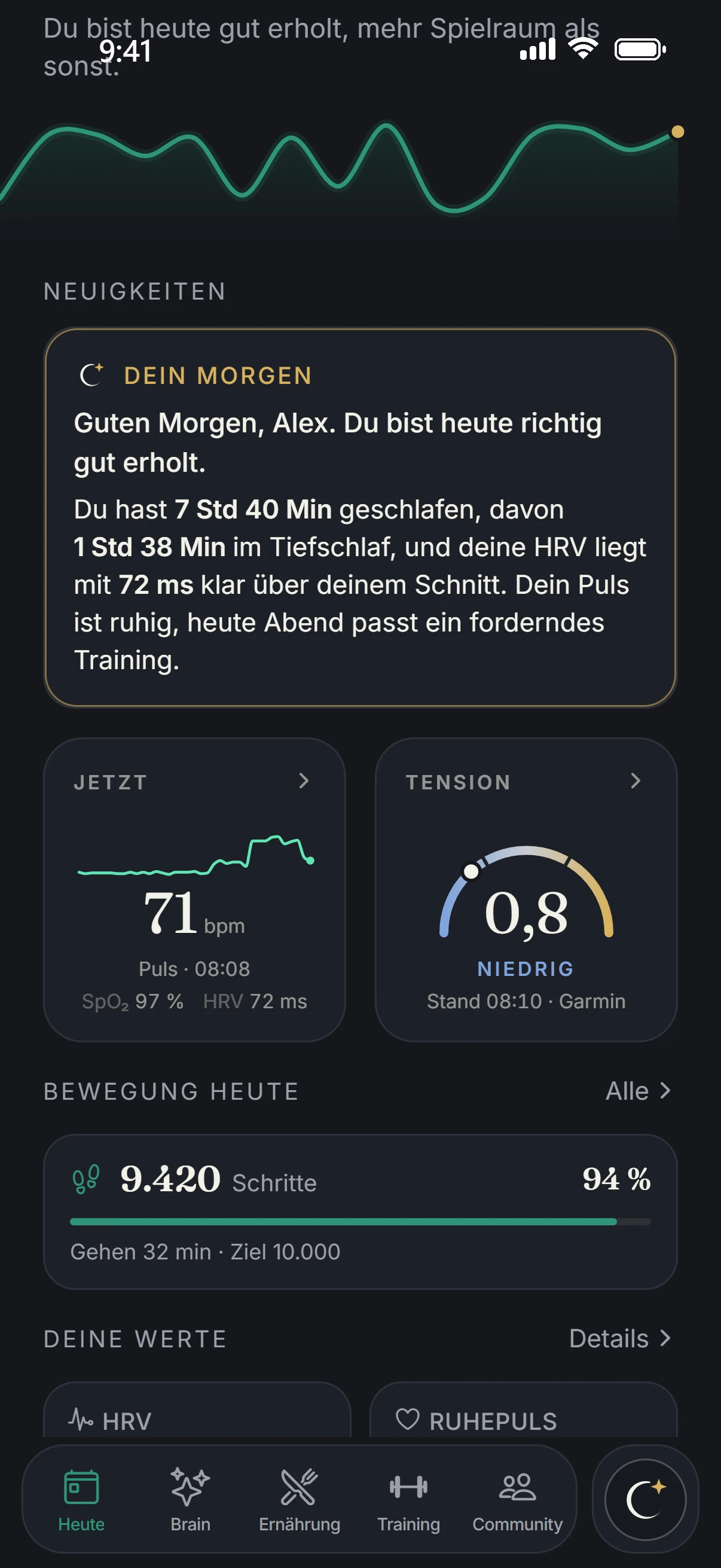
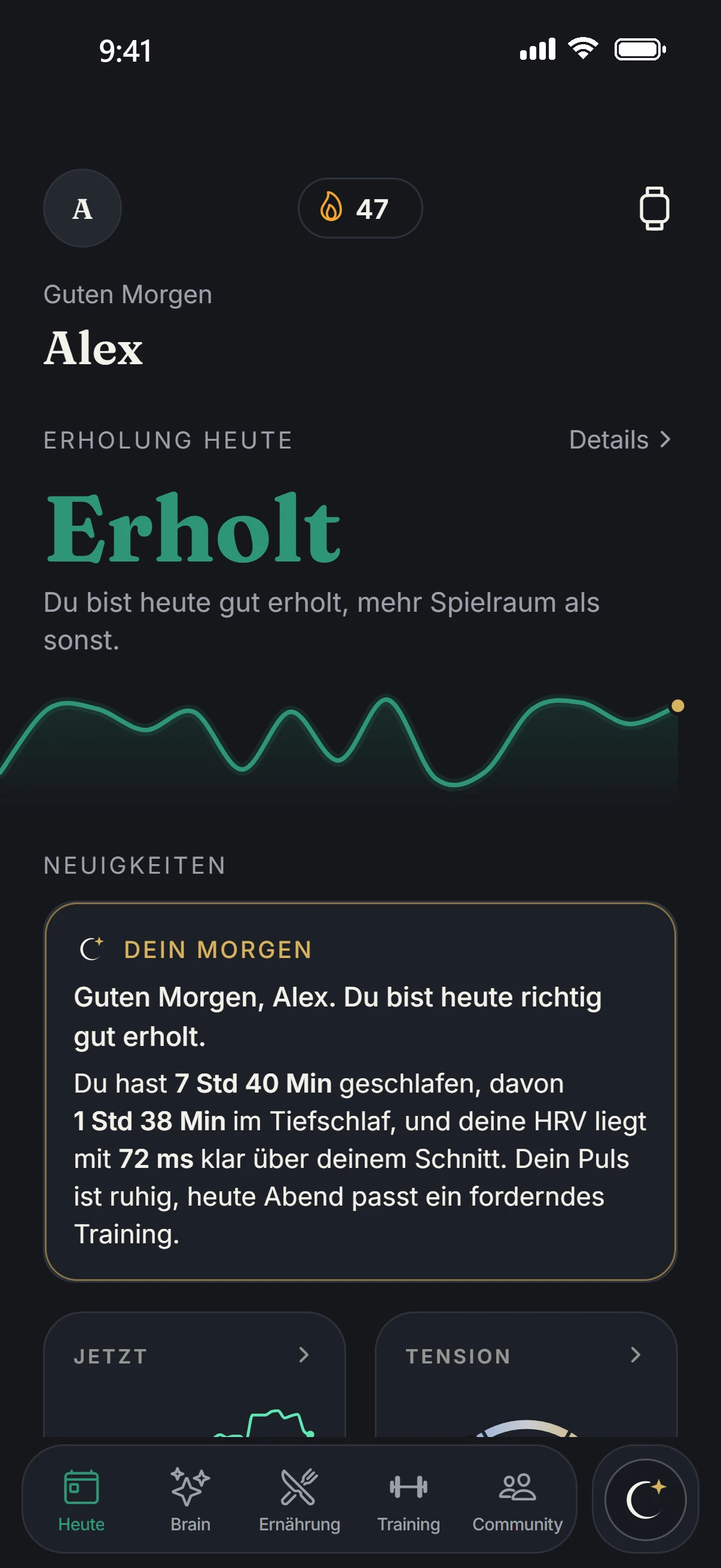
The Today tab of the app: Good morning Alex, recovery today Recovered, below it Your Morning.
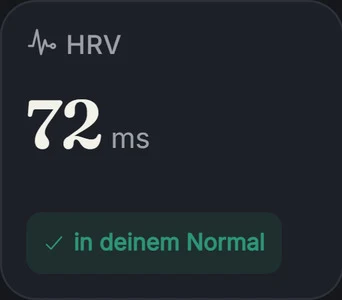
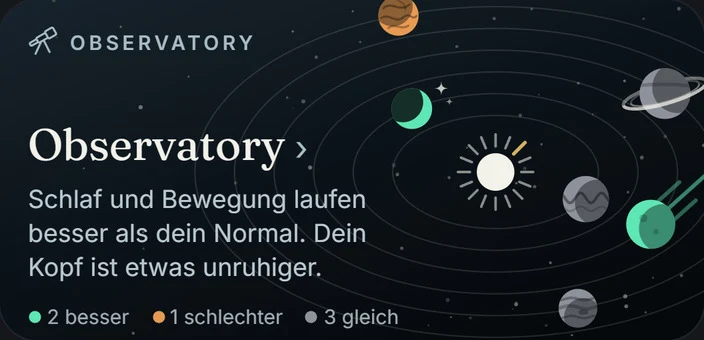
Tile from the app: HRV 72 ms, in your normal. Tile from the app: Observatory. Sleep and activity are running better than your normal. 2 better, 1 worse, 3 the same.
What you see

Screen by screen.

Every image is a real screen from the app. Above each one it says where to find it.

Today

Your morning, then your numbers.

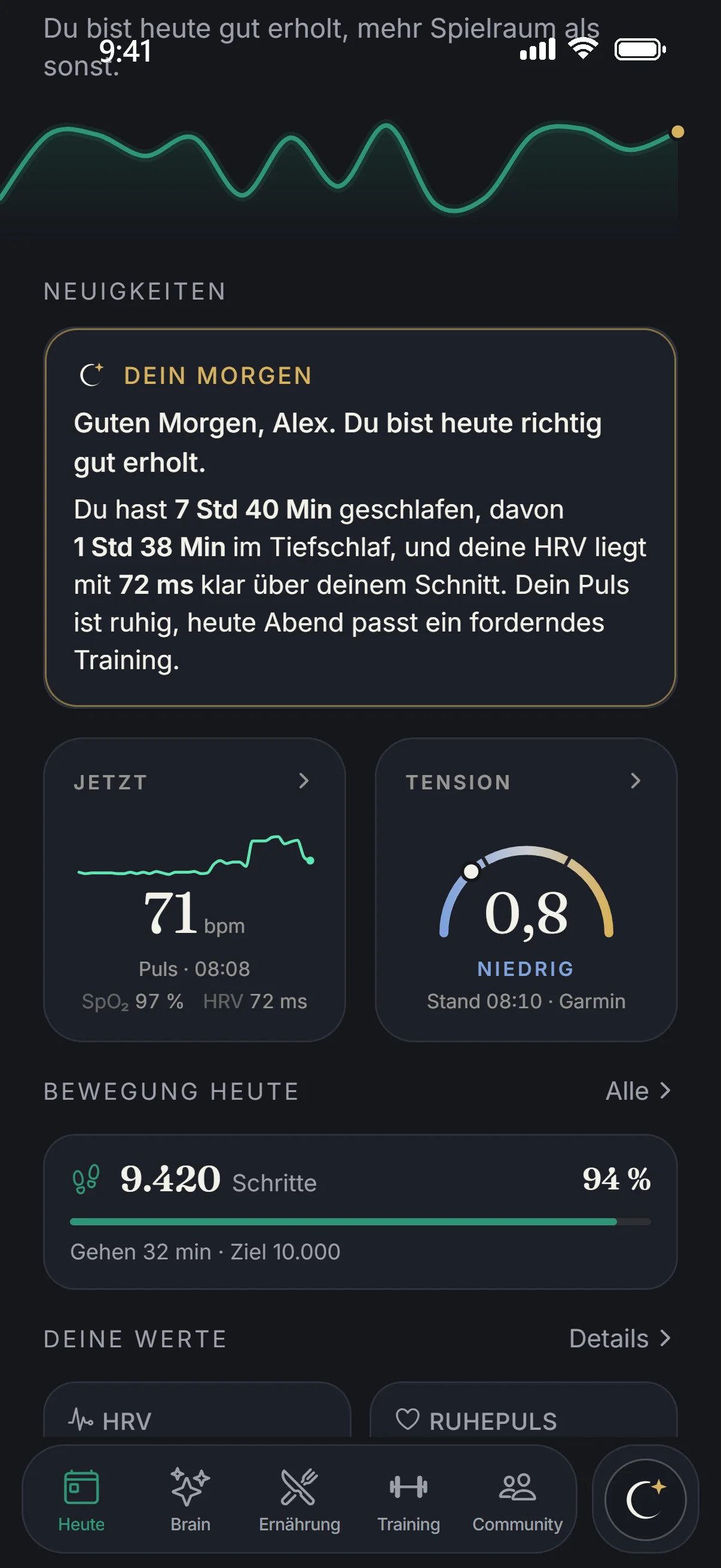
Under NEWS you find YOUR MORNING: a few sentences about your night and your day. Below it, NOW with your pulse, TENSION, ACTIVITY TODAY and YOUR VALUES.

  • Aellic writes YOUR MORNING once a day from the facts of the day: sleep against need, up to two signals and one recommendation.
  • A signal counts from a 3% deviation, for skin temperature from 0.2 °C. Every number in the text is checked against the measurement. If one does not match, a fixed template sentence appears instead.
  • YOUR VALUES: HRV, resting pulse, respiratory rate, skin temperature, SpO₂ and sleep, each against your normal.
  • ACTIVITY TODAY: your steps against your daily goal, in the image 9,420 of 10,000, 94 %.
The Today tab: Your Morning, pulse 71 bpm, Tension 0.8 low, 9,420 steps, 94% of goal.
Today › Recovery

One word instead of a number.

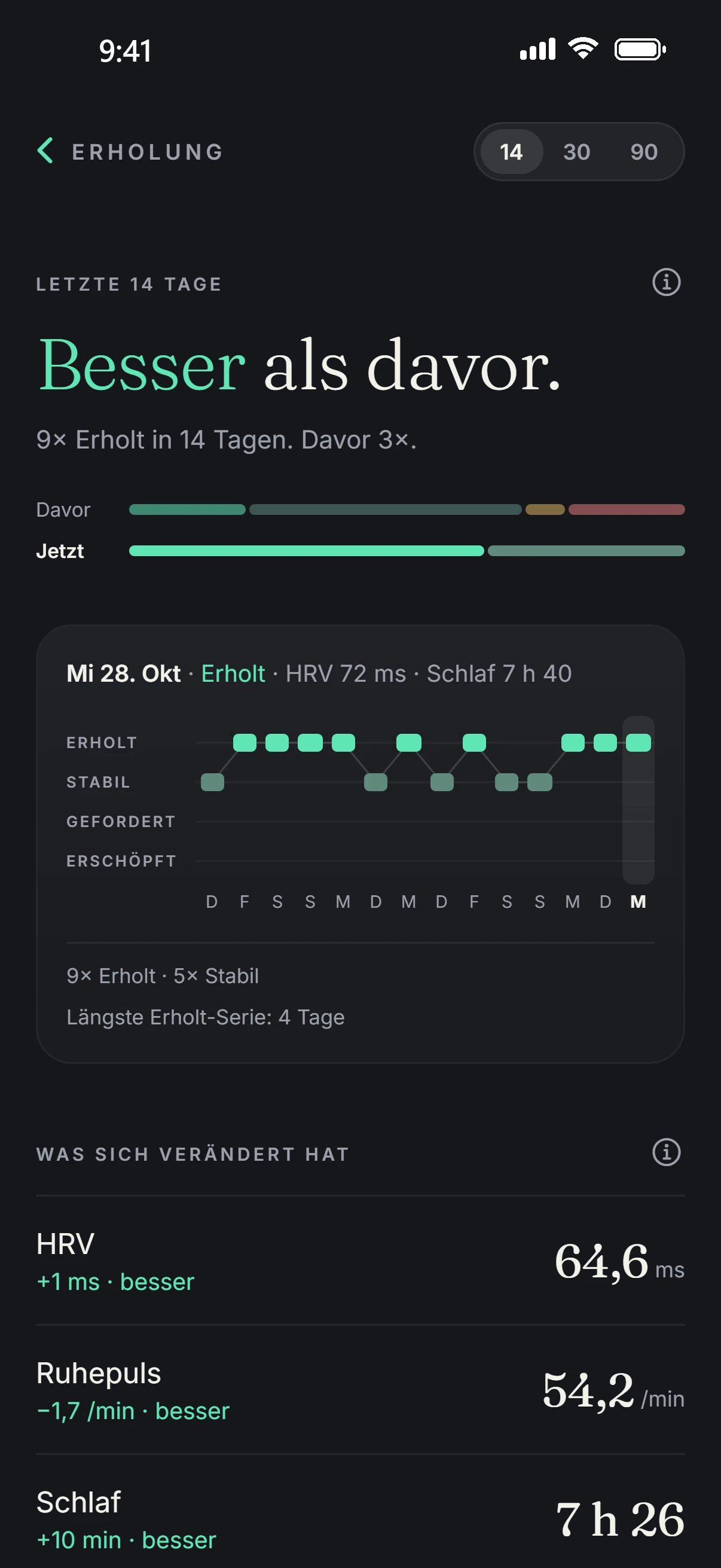
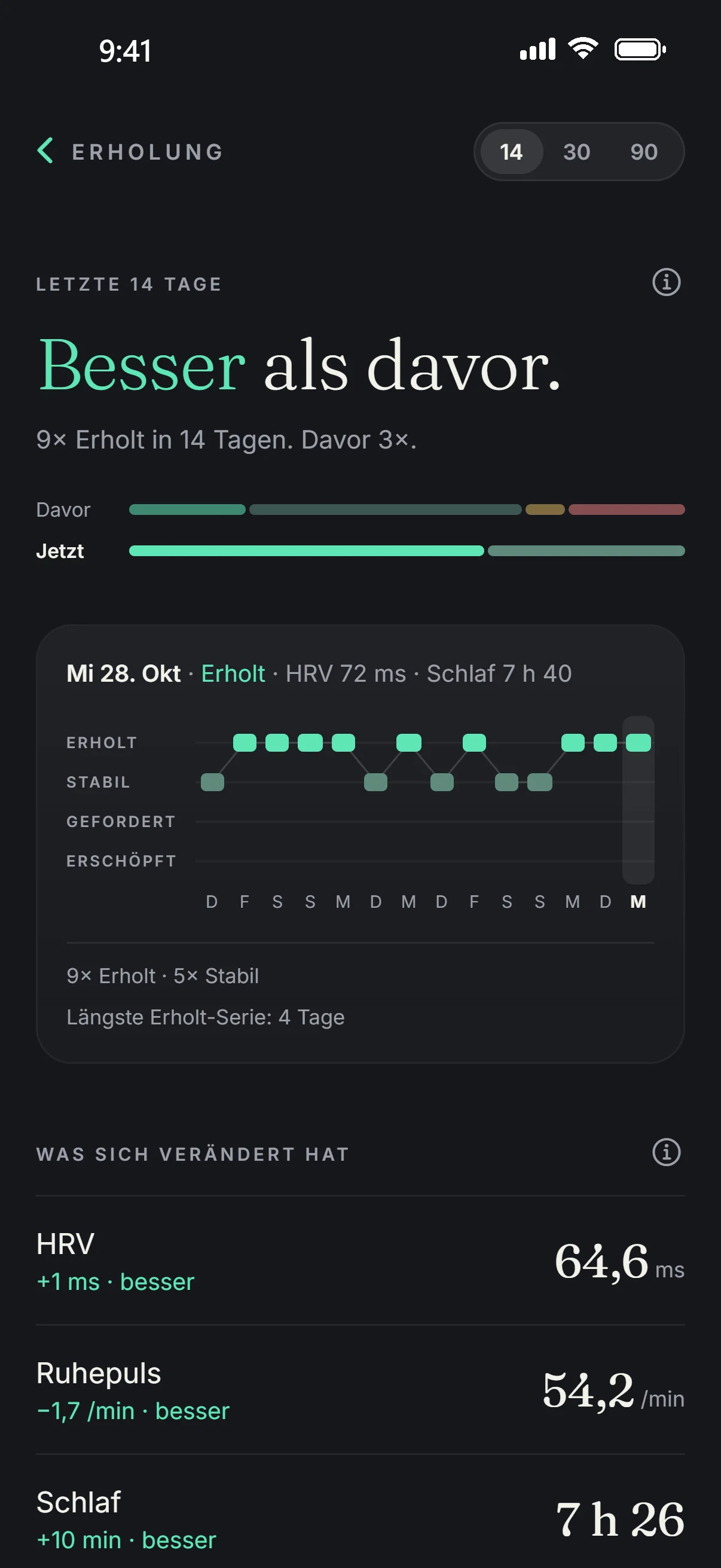
At the top of the tab, under RECOVERY TODAY, there is one word: Recovered, Steady, Challenged or Exhausted. “Details” shows 14, 30 or 90 days on this scale and what has changed.

  • The word appears after 14 nights. Until then, Aellic is calibrating.
  • With most watches, HRV counts for 30%, sleep 30%, resting pulse 25%, respiratory rate 10% and skin temperature 5%.
  • In the image: “Better than before.” Recovered 9 times in 14 days, 3 times before that.
Recovery in the app: Better than before, Recovered 9 times in 14 days, a scale from Recovered to Exhausted.
Today › Sleep

Your night against your need.

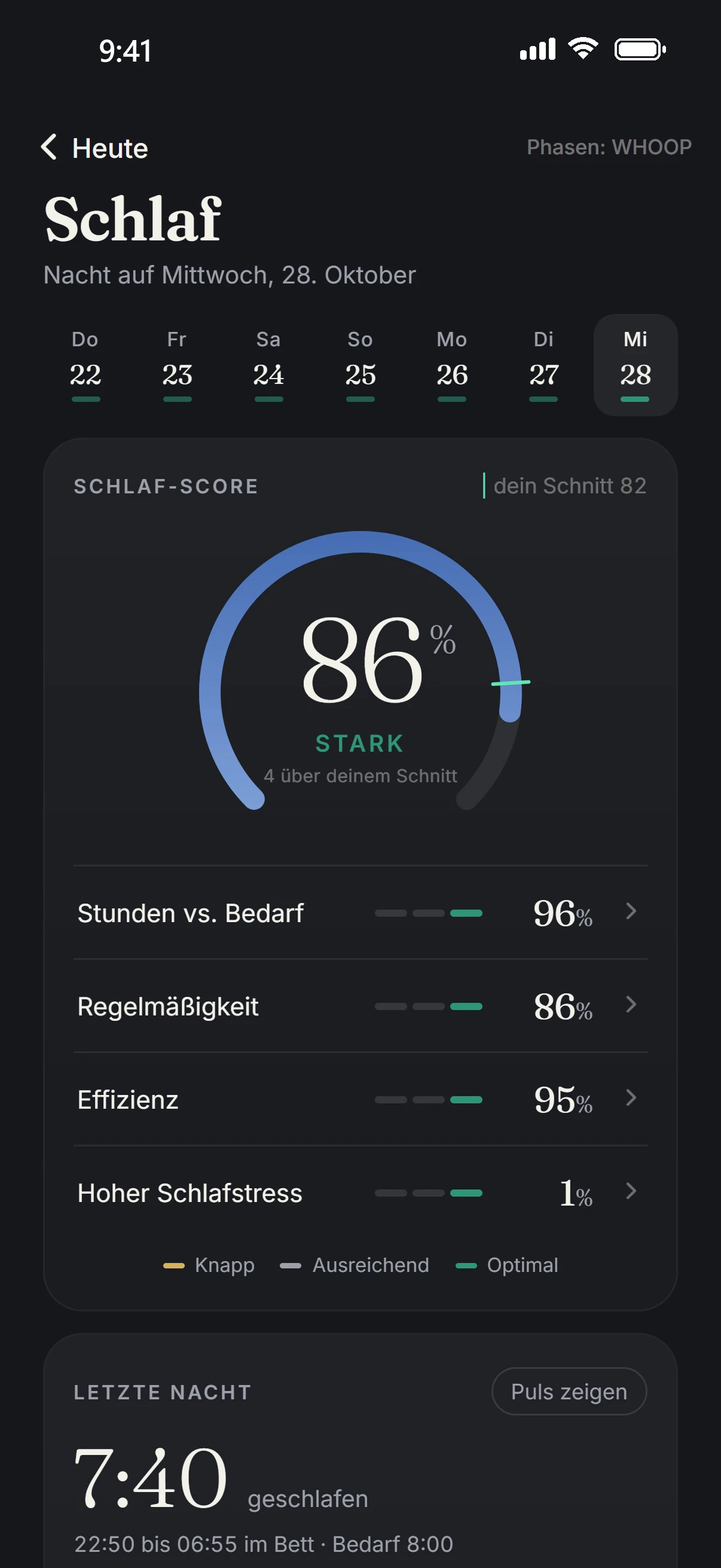
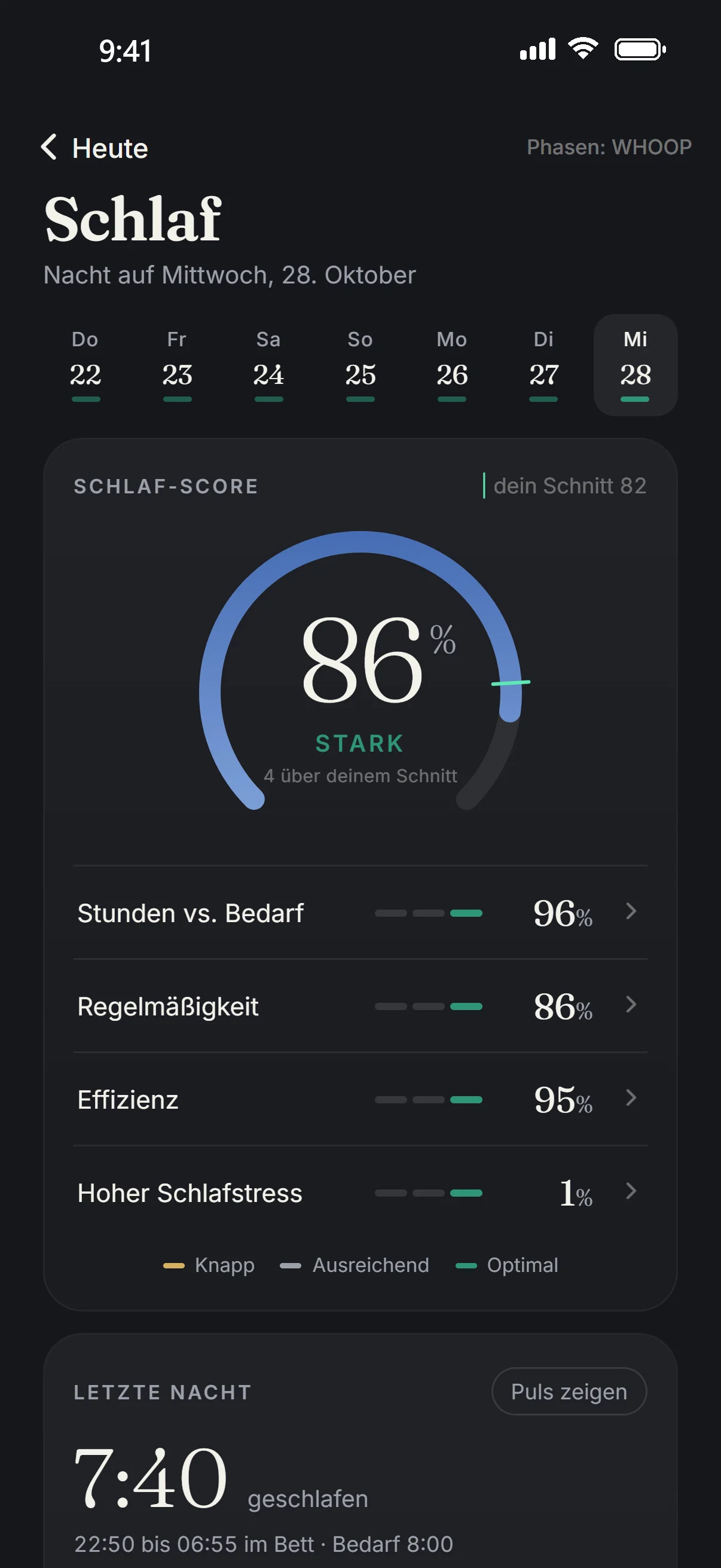
The SLEEP SCORE with its parts: hours vs. need, regularity, efficiency and high sleep stress. Below it, LAST NIGHT with duration, falling asleep and waking up.

  • Your average sits next to the score. In the image 86%, STRONG, 4 above your average of 82.
  • Under YOUR VALUES, sleep is measured against the need for your age, with an hour of leeway up and down.
  • Your night has its own stress view: the curve of the night and how long in which level.
Sleep in the app: sleep score 86%, strong, last night 7:40 slept.
Today › Tension

Tension across the whole day.

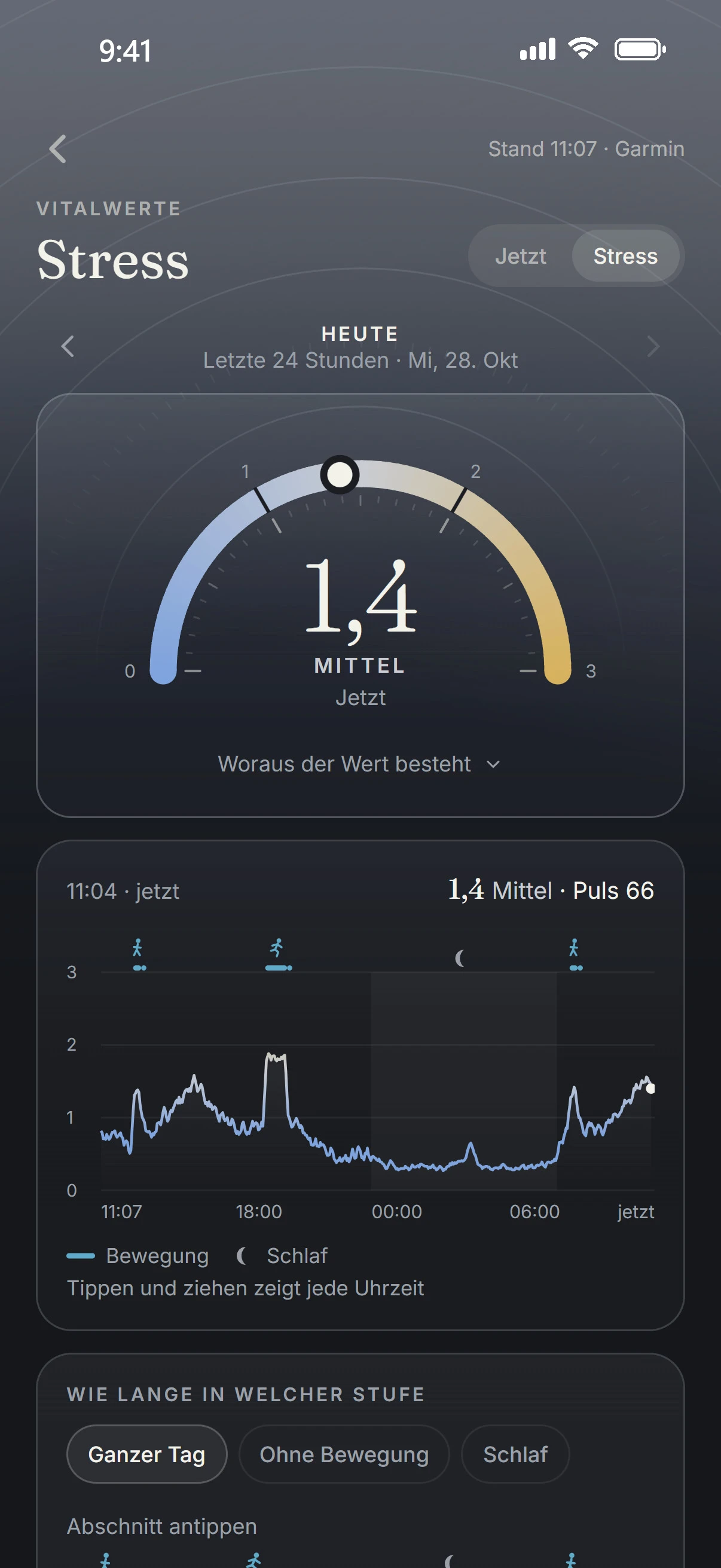
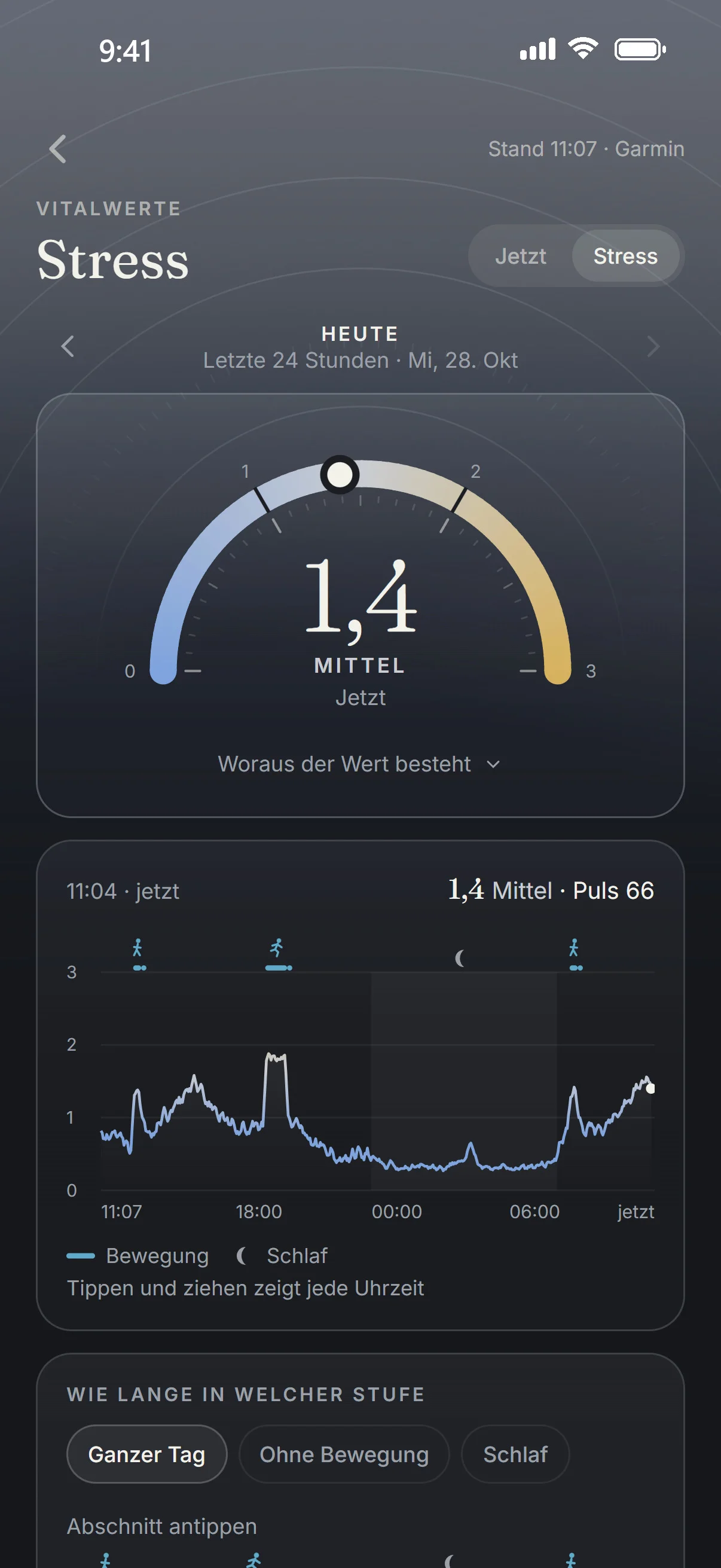
An estimate from pulse and HRV, in steps of 3 minutes, day and night. The scale runs from 0 to 3: Low, Medium, High. In the app the page is called “Stress”.

  • Below it the curve of the day and “How long in which level”, for the whole day, without activity or sleep only.
  • An approximation, not a validated measurement.
Stress in the app: arc from 0 to 3, value 1.4, medium, below it the curve of the last 24 hours.
Today › Observatory

Your System, six areas.

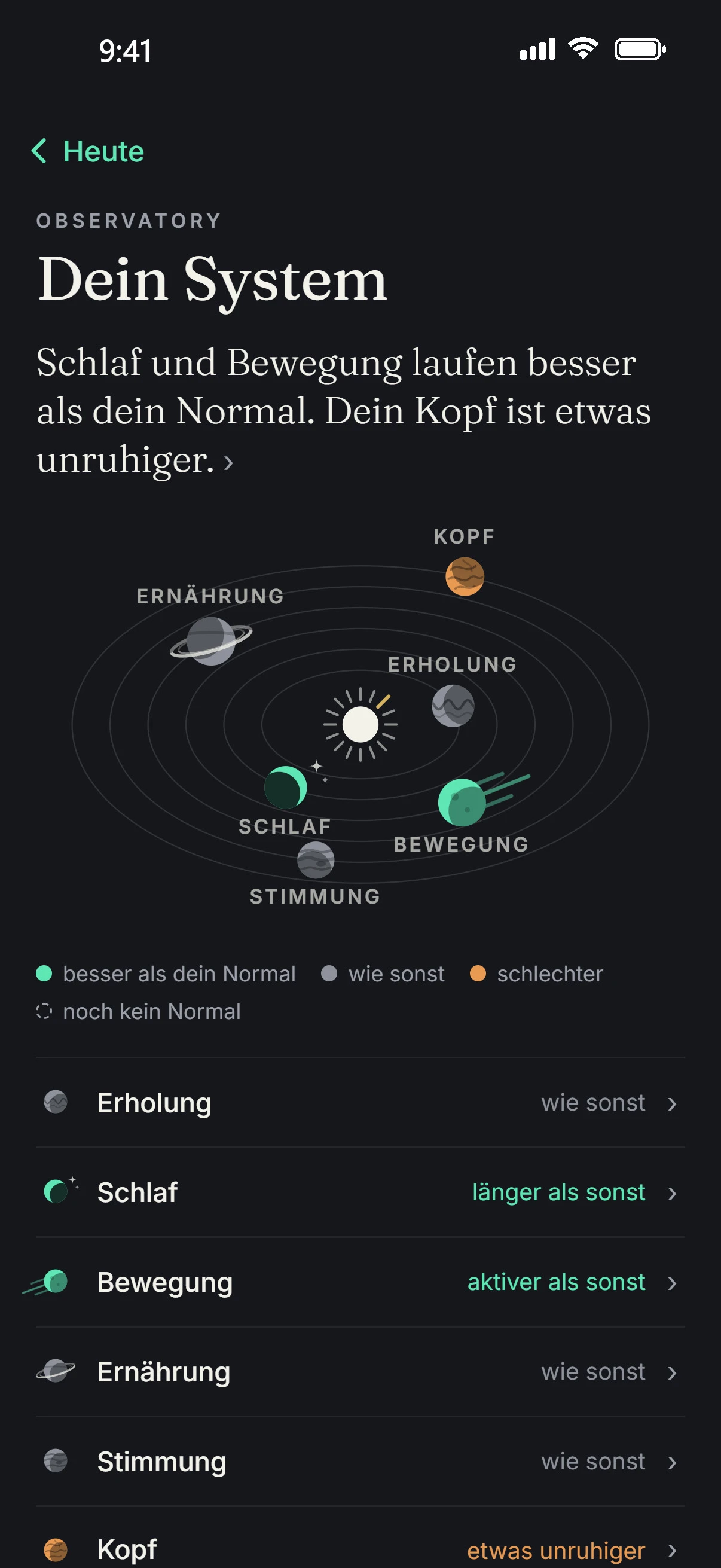
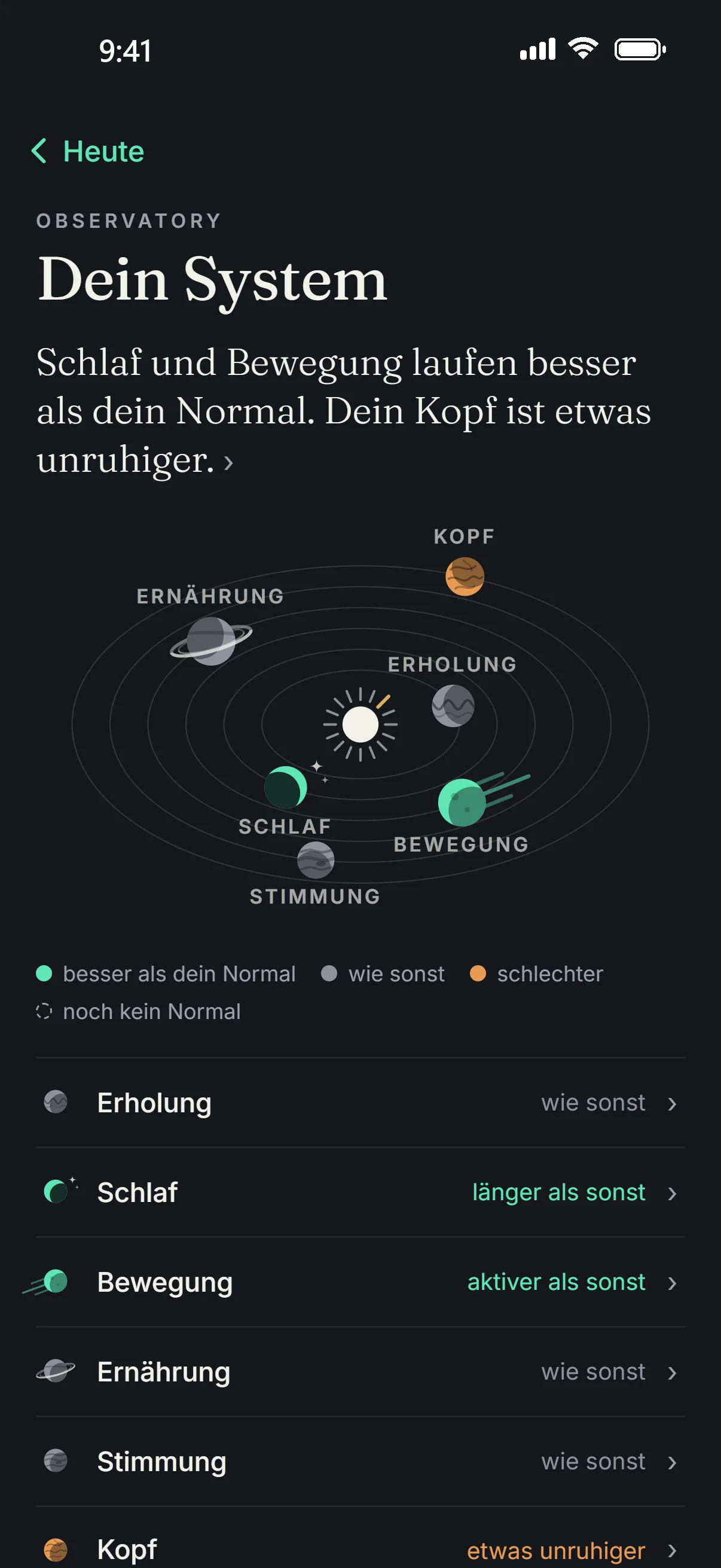
Recovery, sleep, activity, nutrition, mood and mind, each against its own normal. At the top, one sentence says what is running differently right now.

  • State is the average of the last 7 days, normal is the median of the 30 days before.
  • No overall score: Aellic does not add the areas up into one number.
  • The colors: better than your normal, as usual, worse, no normal yet.
Observatory in the app: Your System with six areas, sleep and activity better than your normal, mind a bit more restless.
Today › Journal

Your evening, next to your night.

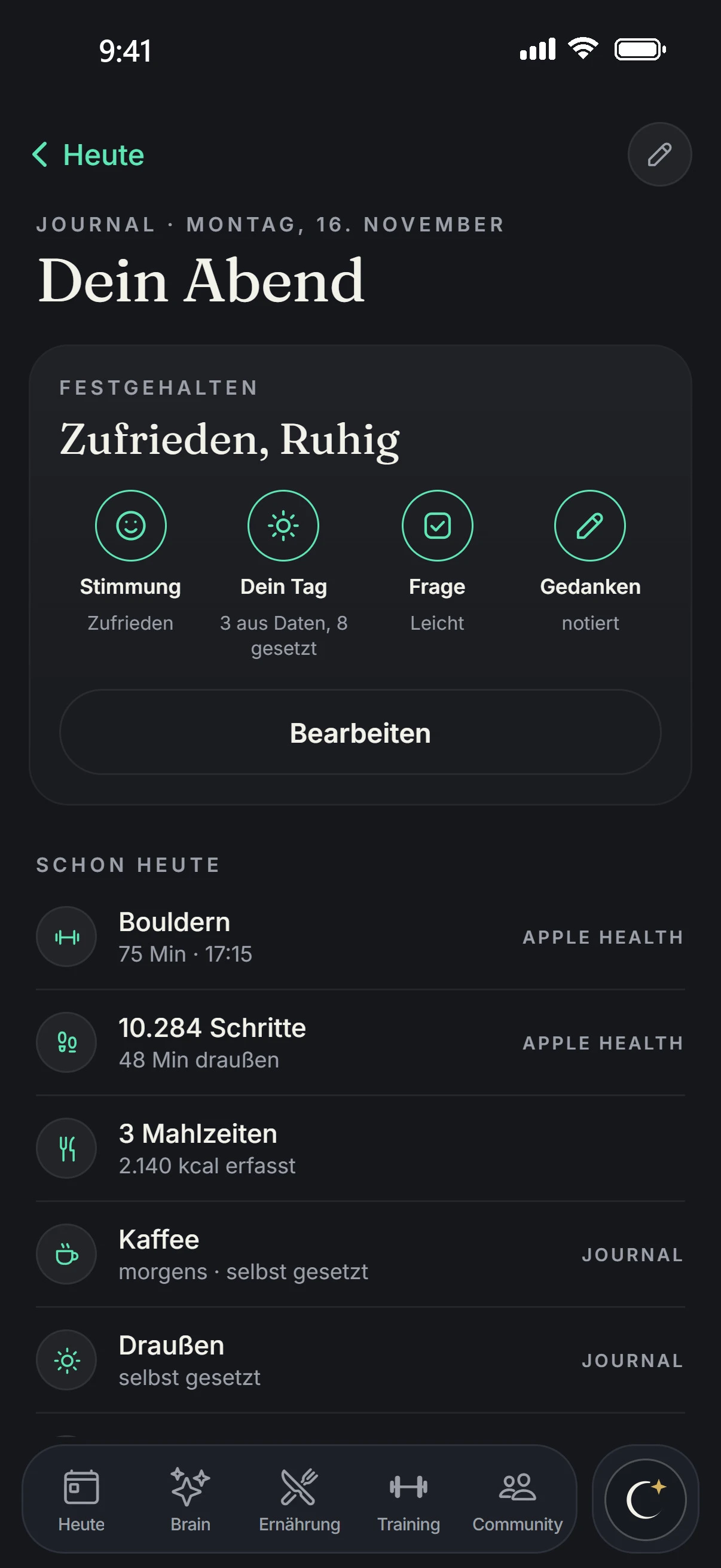
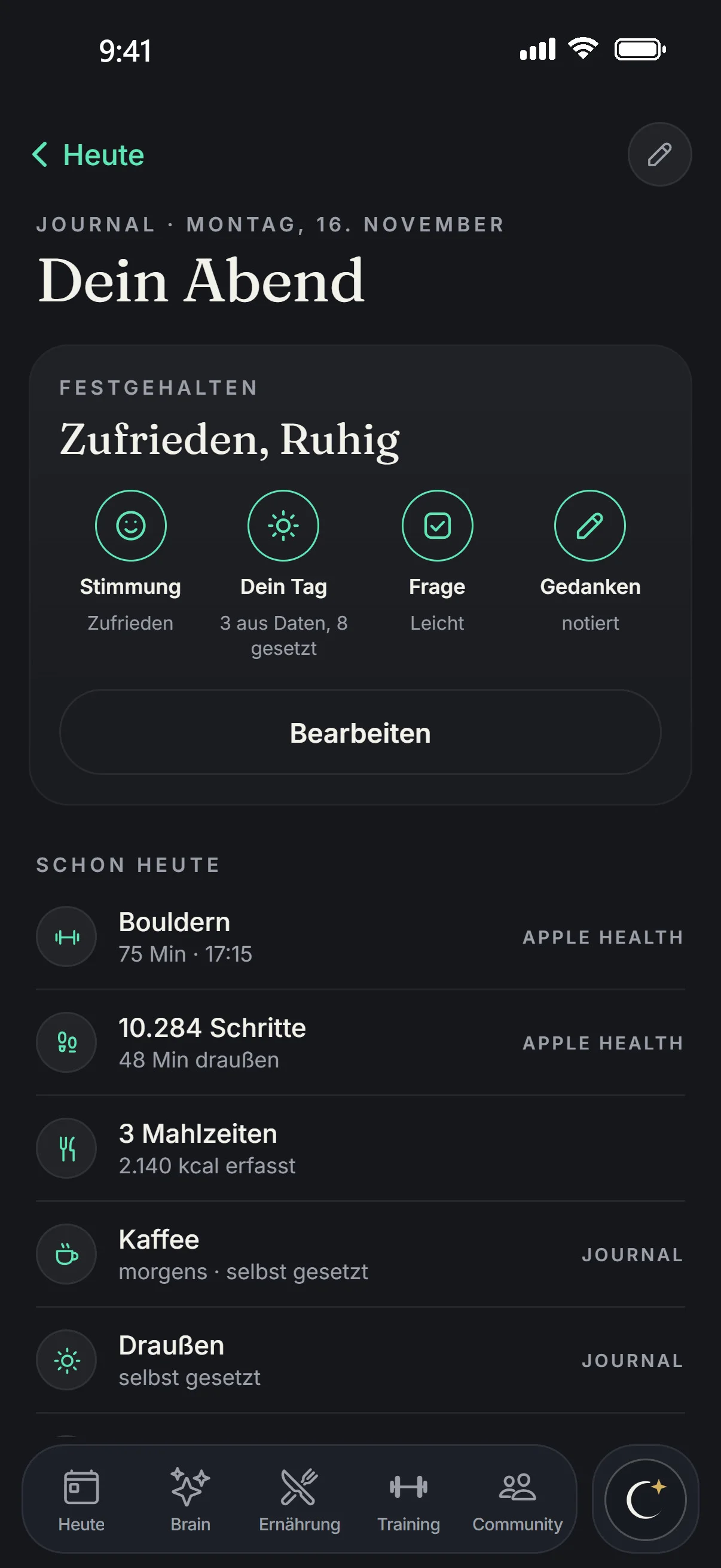
A row on Today opens your journal. In the evening it shows what you have captured today and what is still open: mood, your day, the question of the day and your thoughts. In the morning, last night's entry sits next to your night.

  • Below it: what your journal shows and your last 14 days.
  • In the morning, one tap answers “Woke up rested?”.
  • A tap on a day in the strip opens it in the Observatory.
The journal in the app: your evening on Monday 16 November, mood Satisfied and Calm, already today bouldering 75 min, 10,284 steps, 3 meals with 2,140 kcal.
Today › Journal › Evening

The evening as four cards.

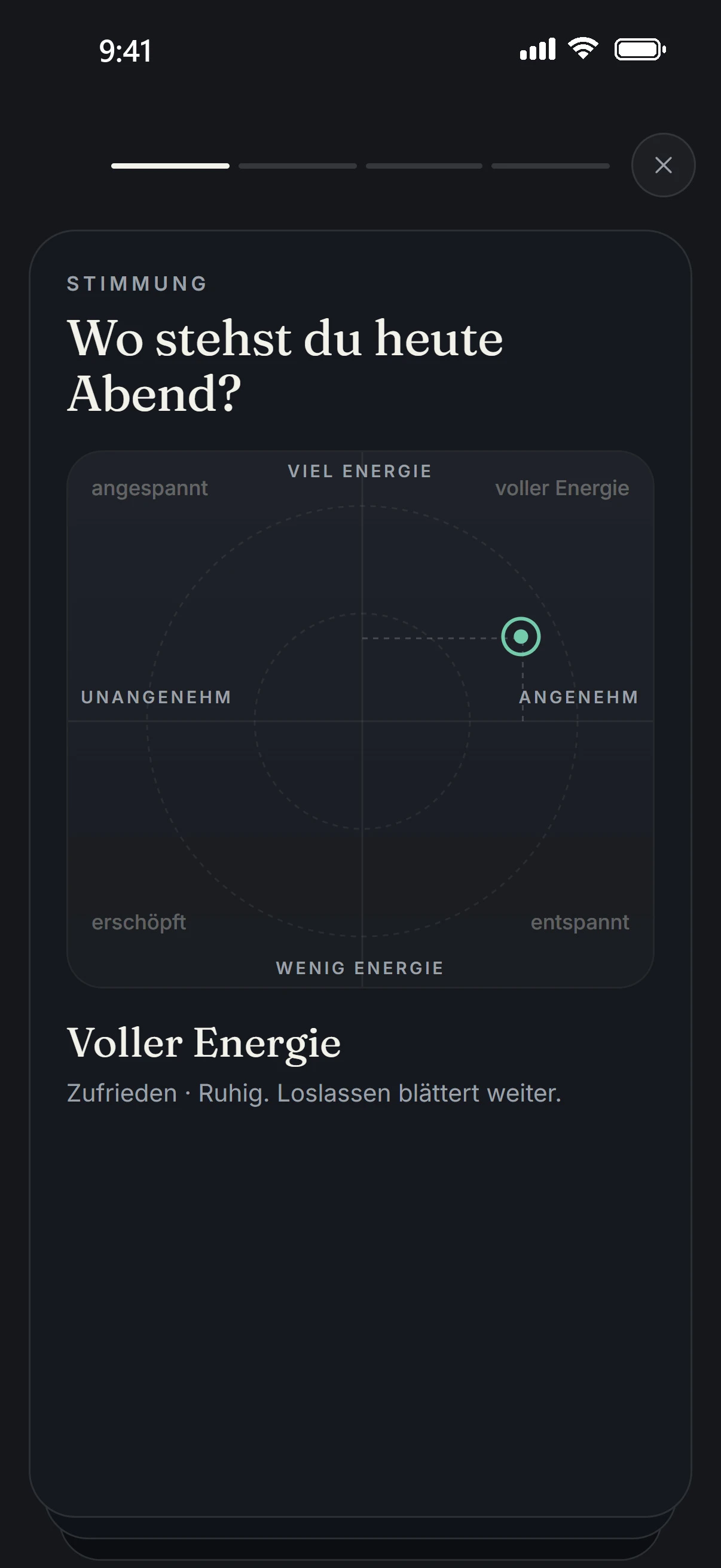
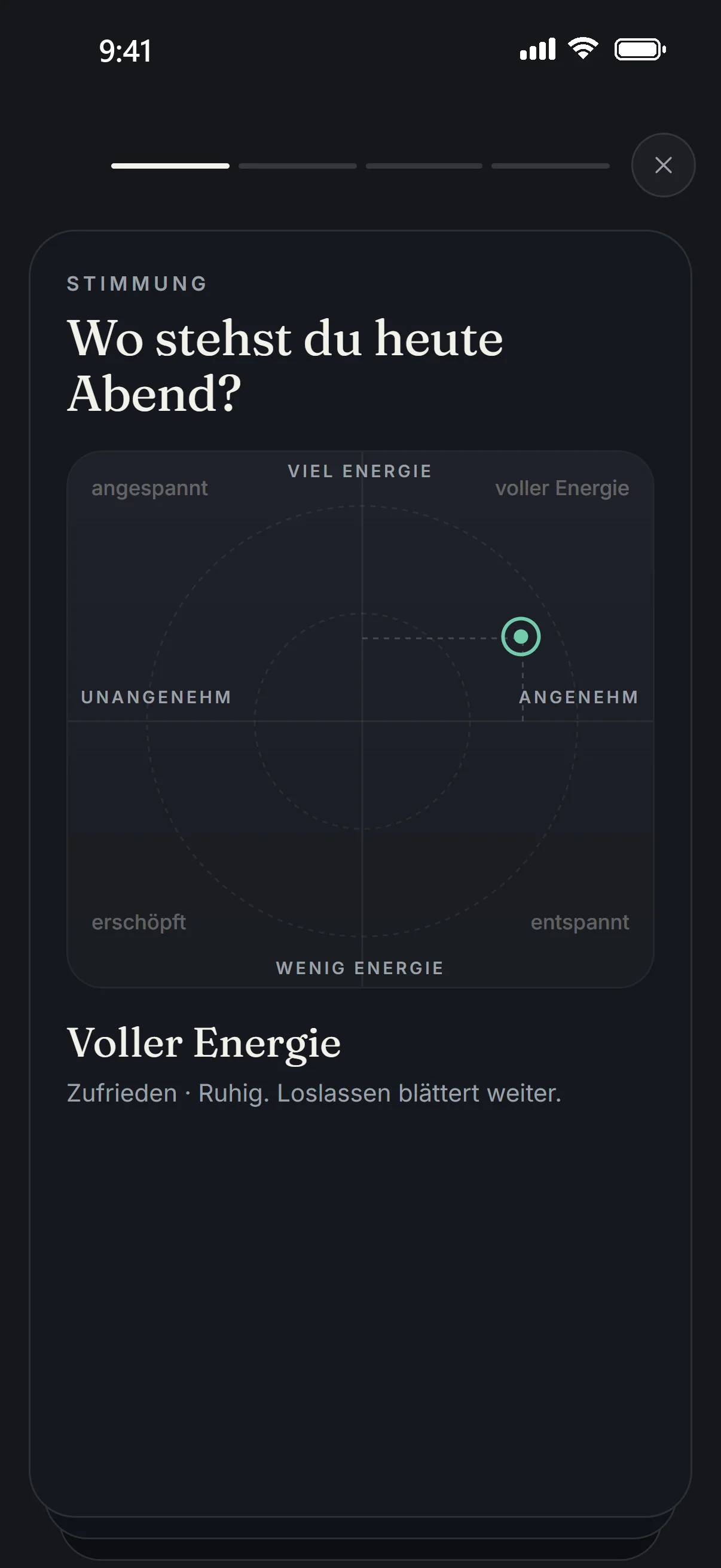
Mood: put a finger in the field and drag. Your day: what Aellic already knows, plus what only you know. Then the question of the day and, if you like, a few more thoughts.

  • In the evening, a card under NEWS asks what you did today.
  • You can speak into a card instead of typing.
  • Each card is saved right away. What you write, Aellic sorts in the background, and the result shows up in the Brain tab.
The evening in the app: first card asks about your mood, “Where do you stand this evening?”, set to “Full of energy, Satisfied · Calm” on a grid from low to high energy and unpleasant to pleasant.
Today › More › Insights

Your Aellic Age.

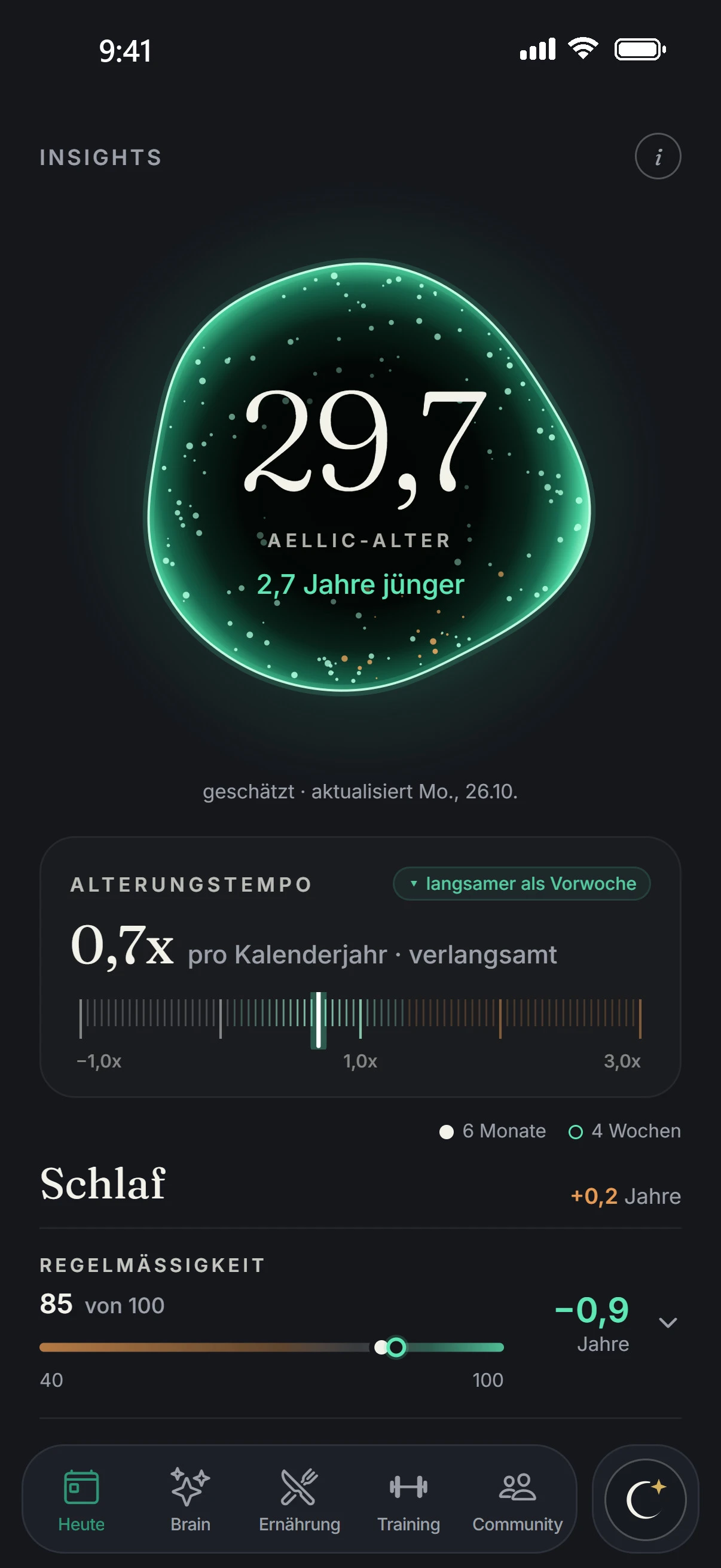
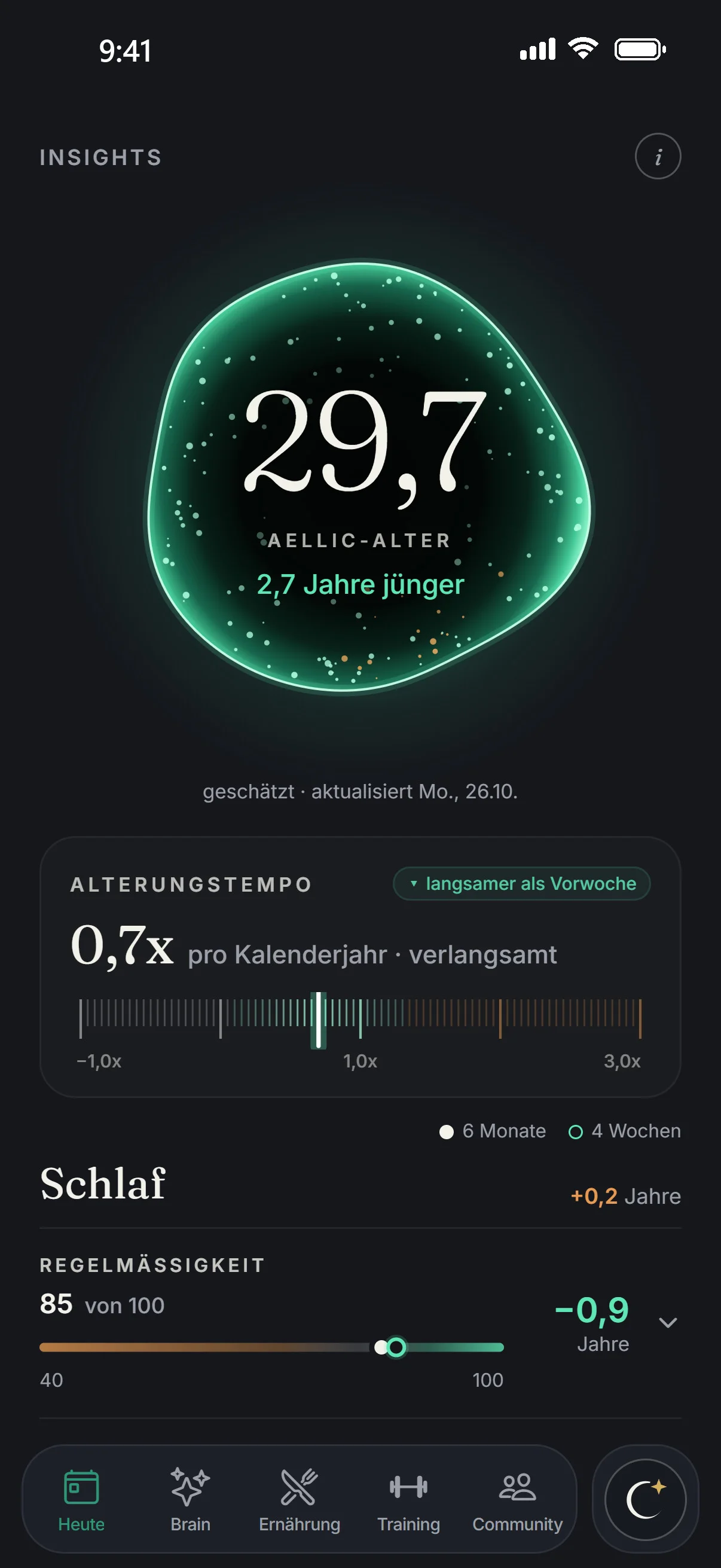
Your calendar age plus years from seven factors in three groups: sleep, activity and fitness. In the image 29.7, so 2.7 years younger.

  • New every Monday. Each factor is shown with its years.
  • PACE OF AGING: how many years your body ages per calendar year. In the image 0.7x, slowed.
Insights in the app: Aellic Age 29.7, 2.7 years younger, pace of aging 0.7x.
Today › More › Insights › Weekly review

Your week in one view.

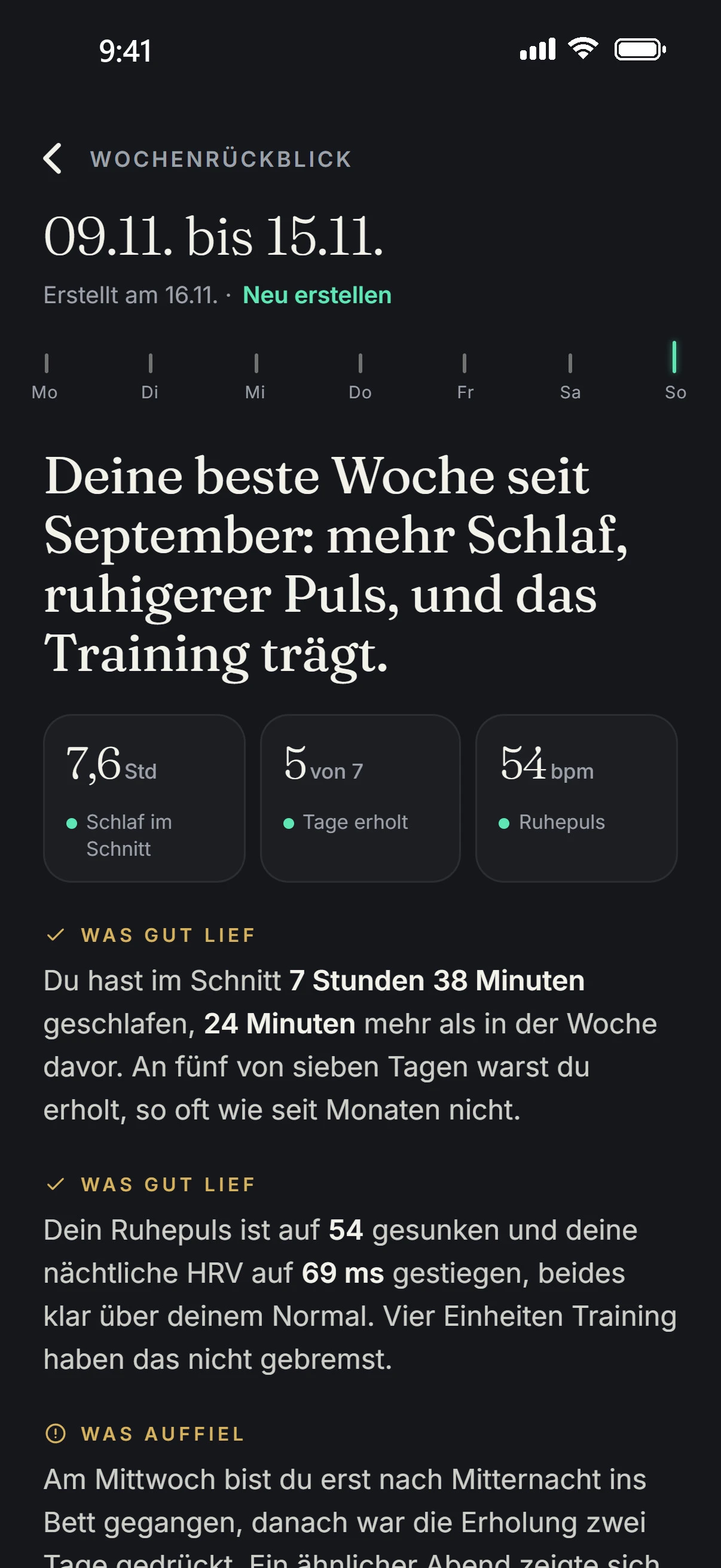
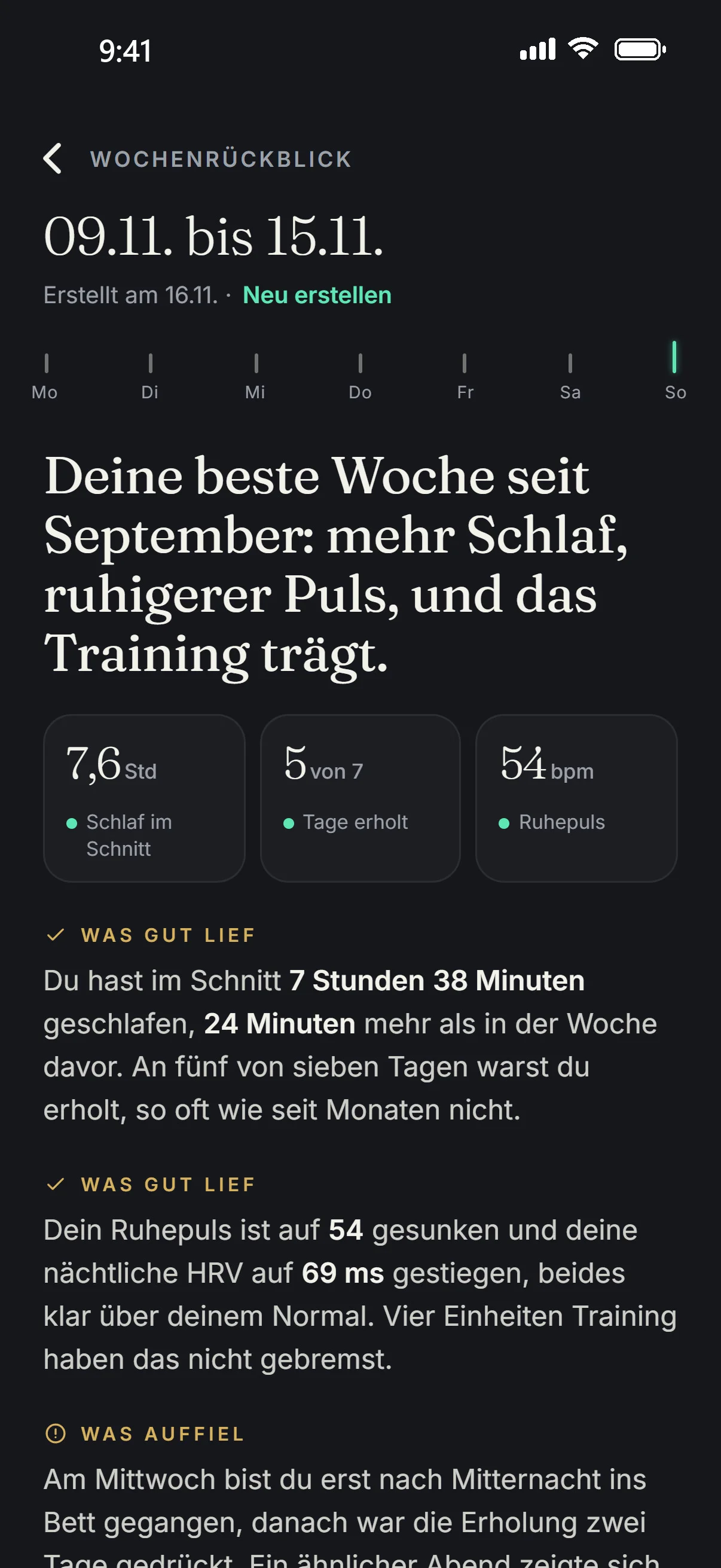
The period at the top, the seven days as ticks below it. Then the review: a headline, up to three key figures, sections and a focus for the next week, followed by numbered suggestions.

  • Aellic prepares the review in the background. When you open it, it is ready.
  • “Create again” builds it from the current state.
The weekly review in the app: 9 to 15 Nov, “Your best week since September”, 7.6 h sleep on average, 5 of 7 days recovered, resting heart rate 54 bpm.
Today › More › Insights › Connections

Connections in your own data.

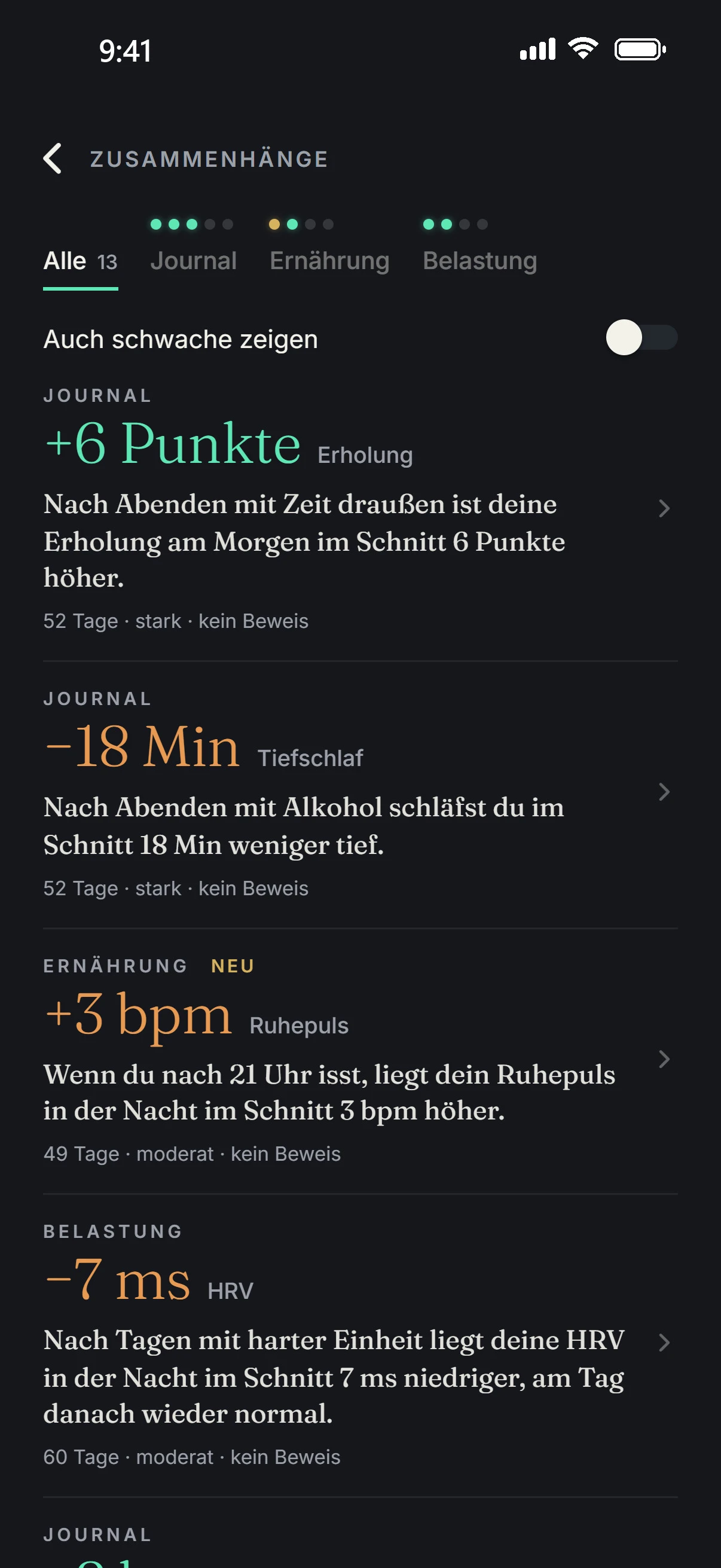
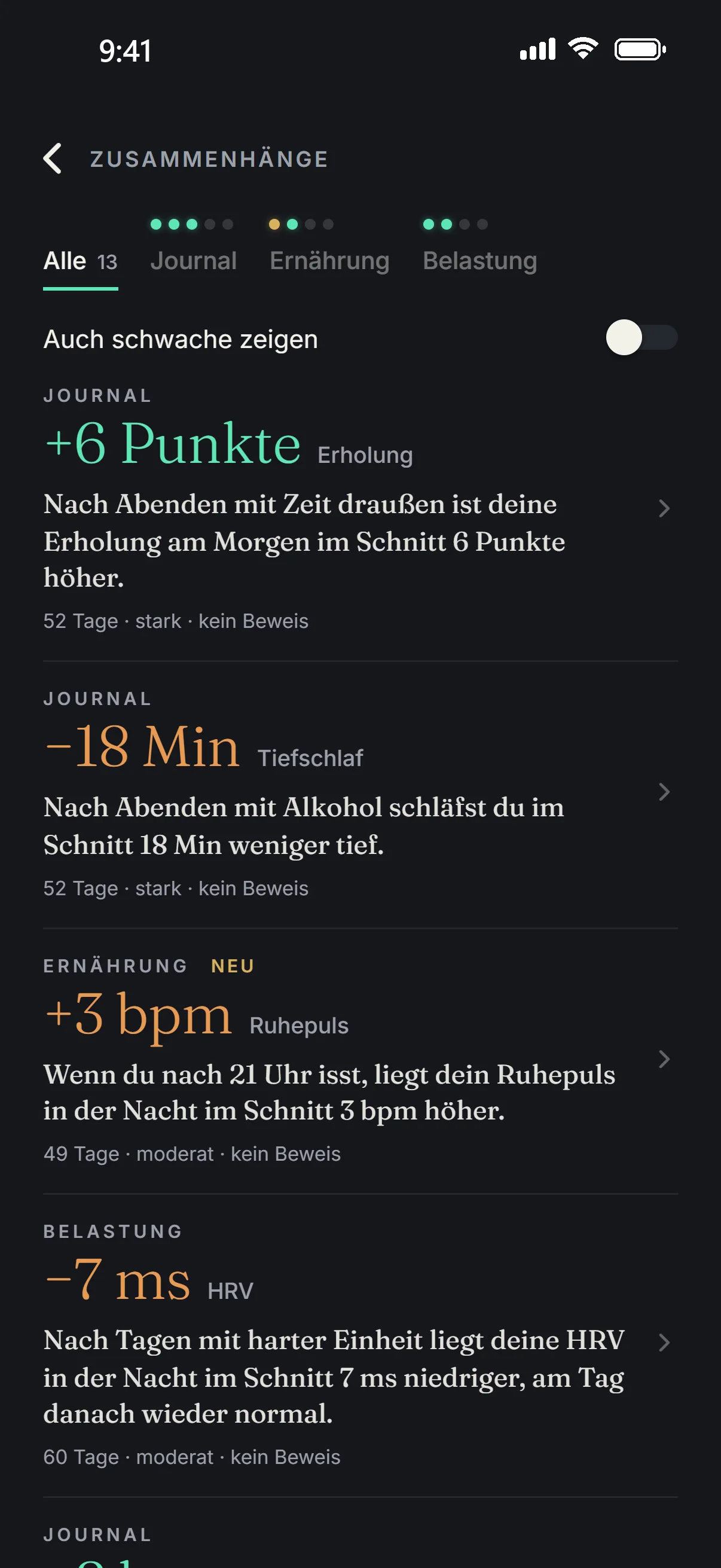
Aellic compares your days and looks for connections, for example between training, sleep and your mood. Each finding is one sentence. A strip at the top filters by area.

  • The tile in Insights shows how many connections hold up, out of how many were tested.
  • Weak ones stay hidden. “Show weak ones too” shows them, dimmed.
  • A connection in your data, not proof. Context, not medical advice.
Connections in the app: time outside +6 points recovery, alcohol −18 min deep sleep, eating after 21:00 +3 bpm resting heart rate, each marked “not proof”.
The Today tab: Your Morning, pulse 71 bpm, Tension 0.8 low, 9,420 steps.Recovery in the app.Sleep in the app.Stress in the app.Observatory in the app.The journal in the app: your evening on Monday 16 November, mood Satisfied and Calm, already today bouldering 75 min, 10,284 steps, 3 meals with 2,140 kcal.The evening in the app: first card asks about your mood, “Where do you stand this evening?”, set to “Full of energy, Satisfied · Calm” on a grid from low to high energy and unpleasant to pleasant.Insights with Aellic Age in the app.The weekly review in the app: 9 to 15 Nov, “Your best week since September”, 7.6 h sleep on average, 5 of 7 days recovered, resting heart rate 54 bpm.Connections in the app: time outside +6 points recovery, alcohol −18 min deep sleep, eating after 21:00 +3 bpm resting heart rate, each marked “not proof”.
How Aellic calculates

Check your normal.

The same bands as under YOUR VALUES. Move the sliders and see when “in your normal” becomes “above” or “below”.

Alex, example values

The other values

Respiratory rateNormal ± 2
Skin temperatureNormal ± 0.4 °C
SpO₂fixed, clinical range95 to 100%
Sleepneed for your ageNeed ± 1 h

Your normal, your band

HRV✓ in your normal
72ms today

Band 54.4 to 76.8 ms · 0.85 to 1.20 × normal

Resting pulse✓ in your normal
54/min today

Band 50.4 to 60.5 /min · 0.90 to 1.08 × normal

Your normal:
Median of the daily averages from the 30 days before today
HRV 64 ms × 0.85 = 54.4 · × 1.20 = 76.8
Today does not count. From 3 days with data; before that, Aellic uses a reference for your age.

If the value is inside the band: “in your normal”. Above it: “above your normal”, below it: “below your normal”. For fixed ranges such as SpO₂ it says “in the normal range”. Example values, your own are in the app.

Tension

0123 1.4 MEDIUM
Pulse share1.4
HRV shareup to 0.5+ 0.0
Tension1.4 · Medium
+10% above reference = 1 · +20% = 2, linear in between, above that softly toward 3.
HRV share = 0.5 × drop ÷ 30%, at most 0.5.
Low below 1 · Medium 1 to under 2 · High from 2.

An approximation from pulse and HRV, not a validated measurement. Between the anchor points and above +20% the curve is simplified here. Example values.

How the value is formed

  1. Your reference. The 40th percentile of your calm, awake minutes from the 7 days before. It takes 3 hours of such minutes.
  2. Pulse against reference. 10% above your reference gives 1, 20% gives 2. Above that the value rises only slowly toward 3.
  3. HRV on top. If your HRV is below your usual (median of the last 14 days), up to 0.5 is added. Full at 30% below.
  4. Recalculated every 3 minutes. Day and night. The tile in the Today tab updates at the same pace. “Without activity” hides activity.
Evidence

Where the numbers come from.

Every rule links to its source in the public register. Where there is none, it says so.

7Factors in the Aellic Age

The factors of your Aellic Age.

Calendar age plus years from seven factors in three groups: sleep (regularity, sleep duration), activity (active time, steps, strength training) and fitness (VO₂max, resting pulse). For the factors and the life table, Aellic relies on these sources. How they turn into years is Aellic's own model.

Set by Aellic, no source.

These parts are rules set by Aellic. They are consistent in themselves, but cannot be derived from studies:

  • the limits of your normal for HRV and resting pulse
  • how strongly each value feeds into the word under RECOVERY TODAY
  • the comparison of the night with your last 30 nights
  • the model behind the Aellic Age
  • the levels of Tension
Questions

What people often ask.

What does “in your normal” mean?

Your normal is the median of your daily averages from the 30 days before today. Today itself does not count. It applies from 3 days with data; before that, Aellic uses a reference for your age. For HRV the band runs from 0.85 to 1.20 × normal, for resting pulse from 0.90 to 1.08 ×. SpO₂ has a fixed range of 95 to 100%, the clinical one.

Why is there no word yet under RECOVERY TODAY?

The word appears after 14 nights; until then, Aellic is calibrating. After that it reads Recovered, Steady, Challenged or Exhausted. With most watches, HRV counts for 30%, sleep 30%, resting pulse 25%, respiratory rate 10% and skin temperature 5%. Aellic deliberately does not show a number for it.

Who writes YOUR MORNING?

Aellic writes the text once a day from the facts of the day: sleep against need, up to two signals from HRV, resting pulse, respiratory rate and skin temperature, and one recommendation. Every number is checked against the measurement. If one does not match, a fixed template sentence appears instead. YOUR MORNING starts after 14 nights.

Is Tension a medical measurement?

No. Tension is an estimate from pulse and HRV, in steps of 3 minutes, day and night. An approximation, not a validated measurement.

Why is there no overall score in Observatory?

Each of the six areas is read against its own normal: the average of the last 7 days against the median of the 30 days before. Aellic does not add the areas up into one number. You see which area is running better, the same or worse.

How often does my Aellic Age change?

Every Monday. It is your calendar age plus years from seven factors, and each factor is shown with its years. The pace of aging compares the change over 4 weeks with the change over 26 weeks and shows how many years your body ages per calendar year.

How do I log what I drink?

Aellic asks twice a day, at midday and in the evening, how much you drank. You tap bottles and glasses. The water tile in the Nutrition tab shows liters against your daily target.

Which watches work with Aellic?

Directly connected are Garmin, WHOOP and Fitbit. Apple Watch and others such as Oura, Polar, Huawei, Coros and Suunto come in through Apple Health on iPhone, and through Health Connect on Android. Aellic runs on iPhone and Android. The page “Your devices” shows each connected device and when it last sent data.

All values on this page are example values.

Your data is stored on servers in Germany, and you can export and delete it. For Alphecca it goes to an AI service provider in the US, details in the privacy policy.

Aellic is available from age 14. At 14 and 15, a parent’s consent is required. Blood values from 18.