Skip to content
Features · Brain

How deeply you thought today.

What you see in the Brain tab, from your thinking to your time in social media, how Aellic sorts your entry into six levels and where the levels come from.
The Brain tab of the app: Thinking today, up to Evaluate, the pyramid from Remember to Create.
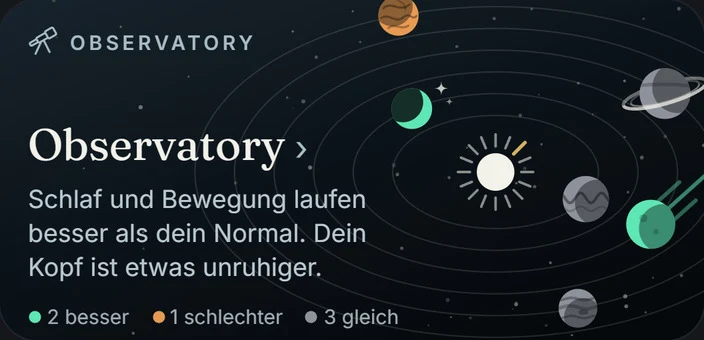
Tile from the app: Observatory. Sleep and activity are running better than your normal. Your mind is a bit more restless.
What you see

Screen by screen.

Every image is a real screen from the app. Above each one it says where to find it. The frame shows what the section is about.

Brain › Thinking today

Six levels, from Remember to Create.

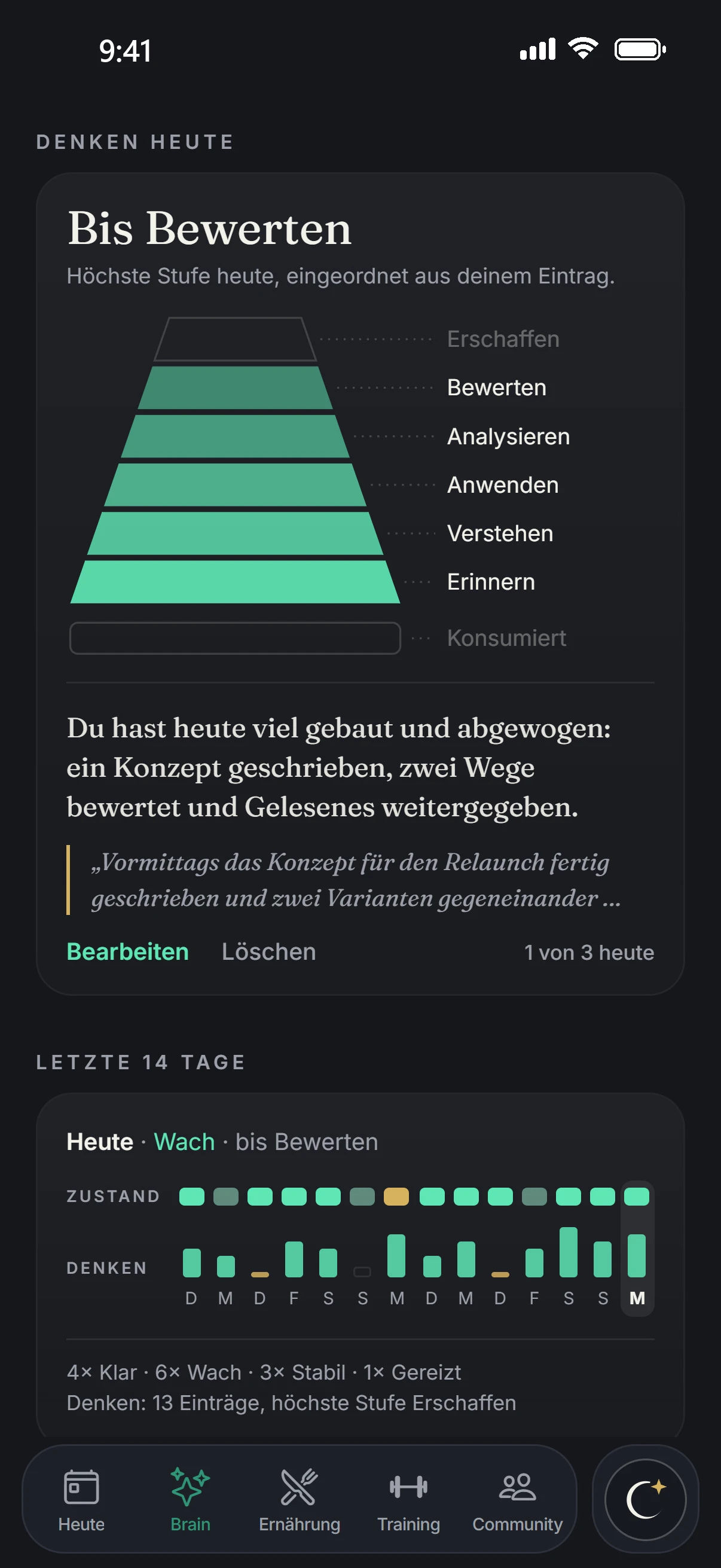
In the evening you jot down what you did. Aellic assigns each activity to a level. At the top is the highest level of the day, here “Up to Evaluate”.
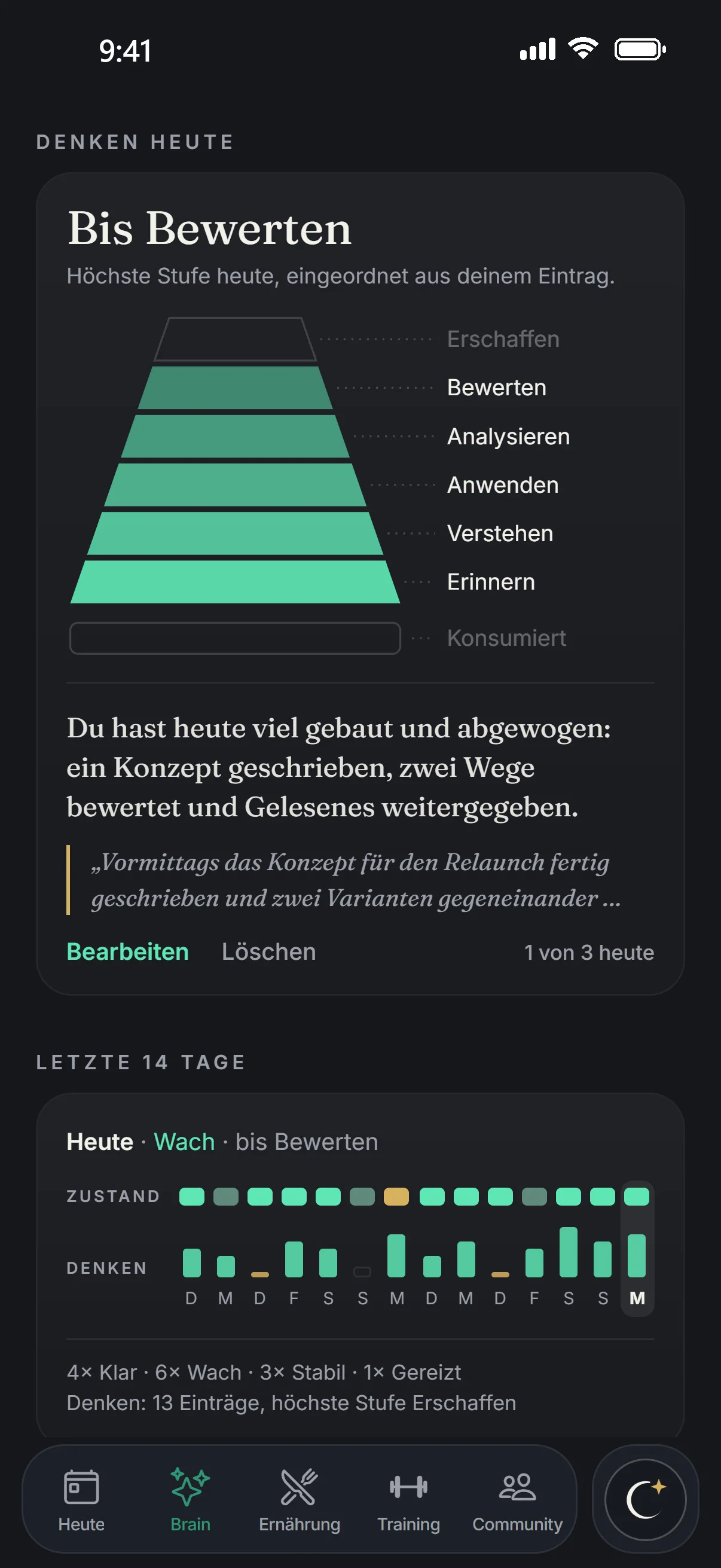
  • Below it the row “Consumed”. It is not a level and never beats one.
  • A dry sentence sums up your day, below it your entry with “Edit” and “Delete”.
  • Up to three assessments a day, on the right it says “1 of 3 today”.
Thinking today in the app: Up to Evaluate, pyramid, summary and entry, 1 of 3 today.
Brain › Last 14 days

Two weeks, two rows.

At the top your state for each day, below it how high you thought. Far right is today: “Today · Alert · up to Evaluate”.

  • Five state words: Clear, Alert, Steady, Irritable, Overstimulated. Never as a number.
  • The state comes from focus apps, sleep, recovery, activity and, if you have any, routines. You can see this at the top of the tab under “What this is based on”.
  • Below it the tally: “4× Clear · 6× Alert · 3× Steady · 1× Irritable”.
Last 14 days in the app: state and thinking for each day, 4× Clear, 6× Alert, 3× Steady, 1× Irritable.
Today › Observatory

Your mind within the system.

In the Today tab, Observatory shows “Your System” with six areas. One of them is mind. Here it reads “a bit more restless”.
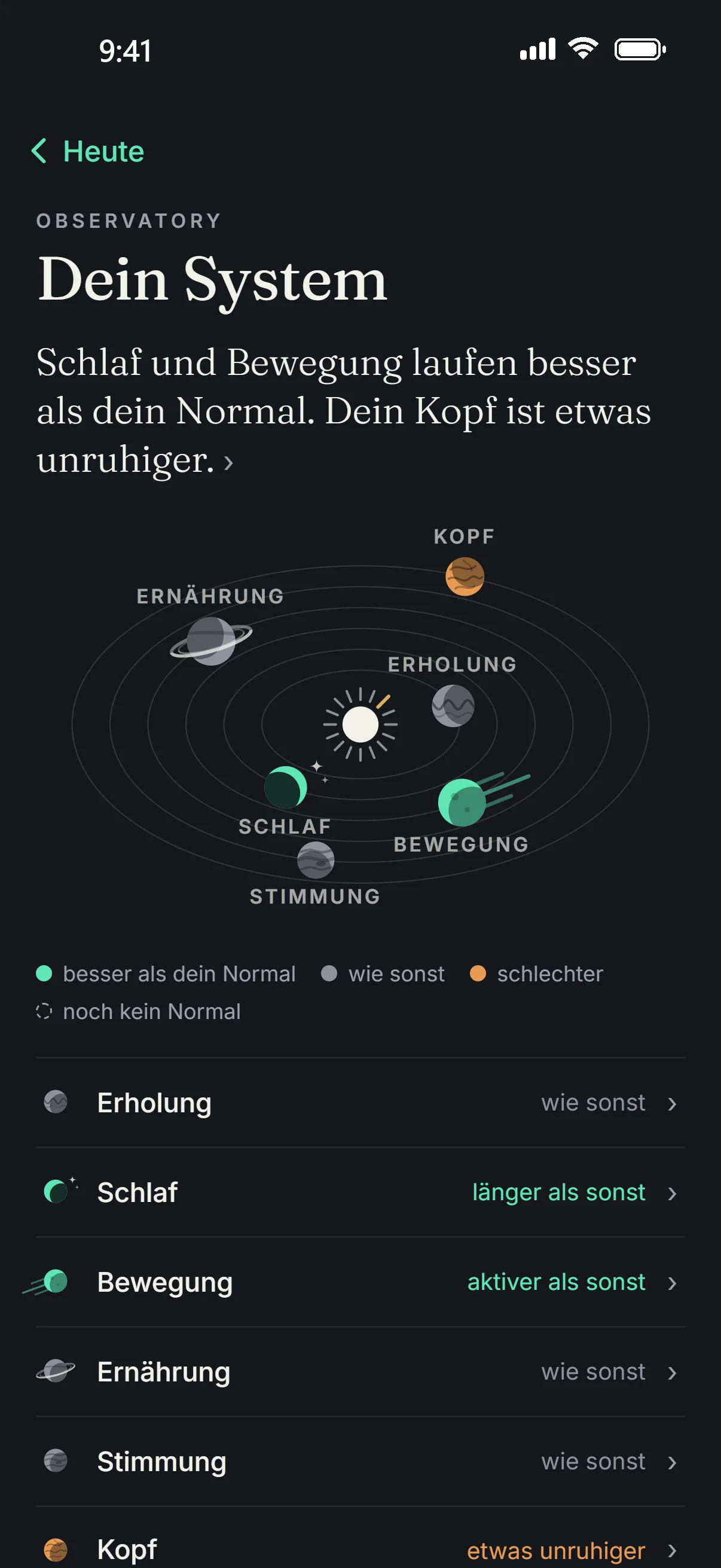
  • Each area is measured against its own normal: the median of the 30 days before, from 3 values. The current state is the average of the last 7 days.
  • “better than your normal”, “as usual”, “worse” or “no normal yet”.
  • No overall number: Aellic does not add the areas up into one number.
Observatory in the app: Your System with six areas, mind a bit more restless.
Brain › Pattern

Your time in social media, month by month.

Pattern shows a month of the time you spend in the social media apps you choose. Below it your weekdays: on which days it gets more. Pattern uses iOS Screen Time, so it is on iPhone only.
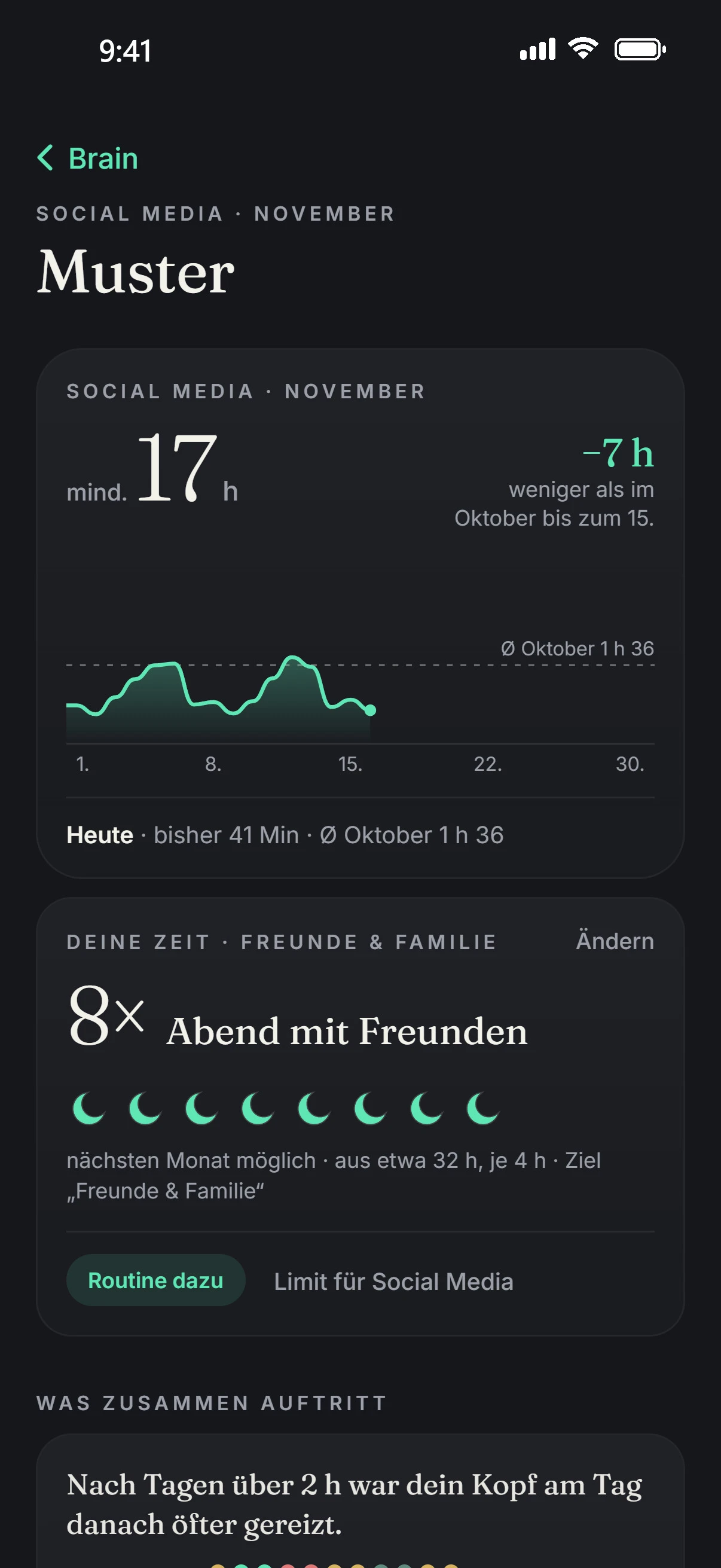
  • A time goal turns the hours into something tangible, for example “about 32 h, 8× evening with friends”.
  • Under “Within limit” the days you kept your limit, with a suggestion to set it one step tighter. It is applied only when you tap.
The Pattern page in the app: social media in November at least 17 h, 7 h less than in October, 8 evenings with friends, “After days over 2 h your head was more irritable the next day.”
Today › Protocols

Four weeks toward one goal.

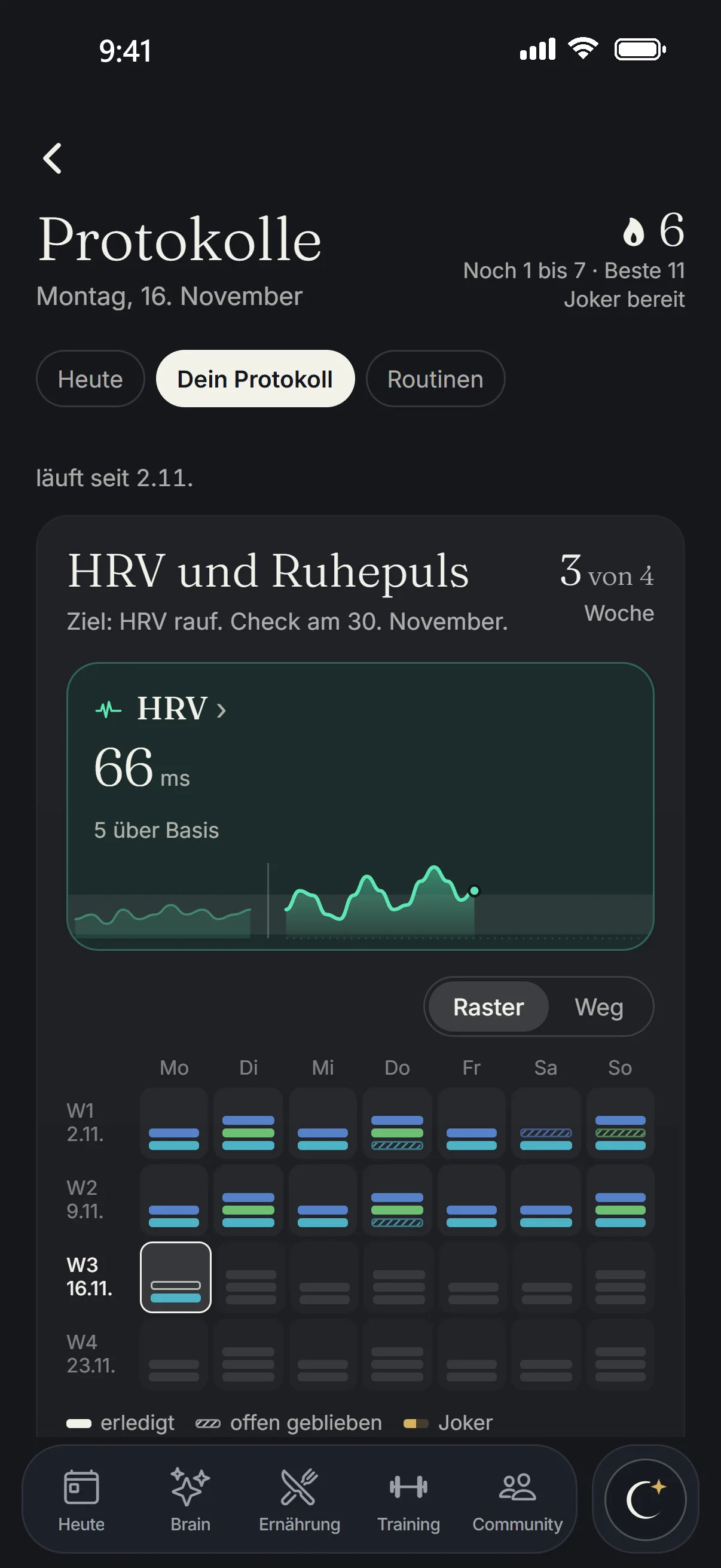
With Aellic Plus you follow a protocol with one goal, for example sleep, HRV or resting heart rate. It runs for four weeks, then a check shows whether it works.
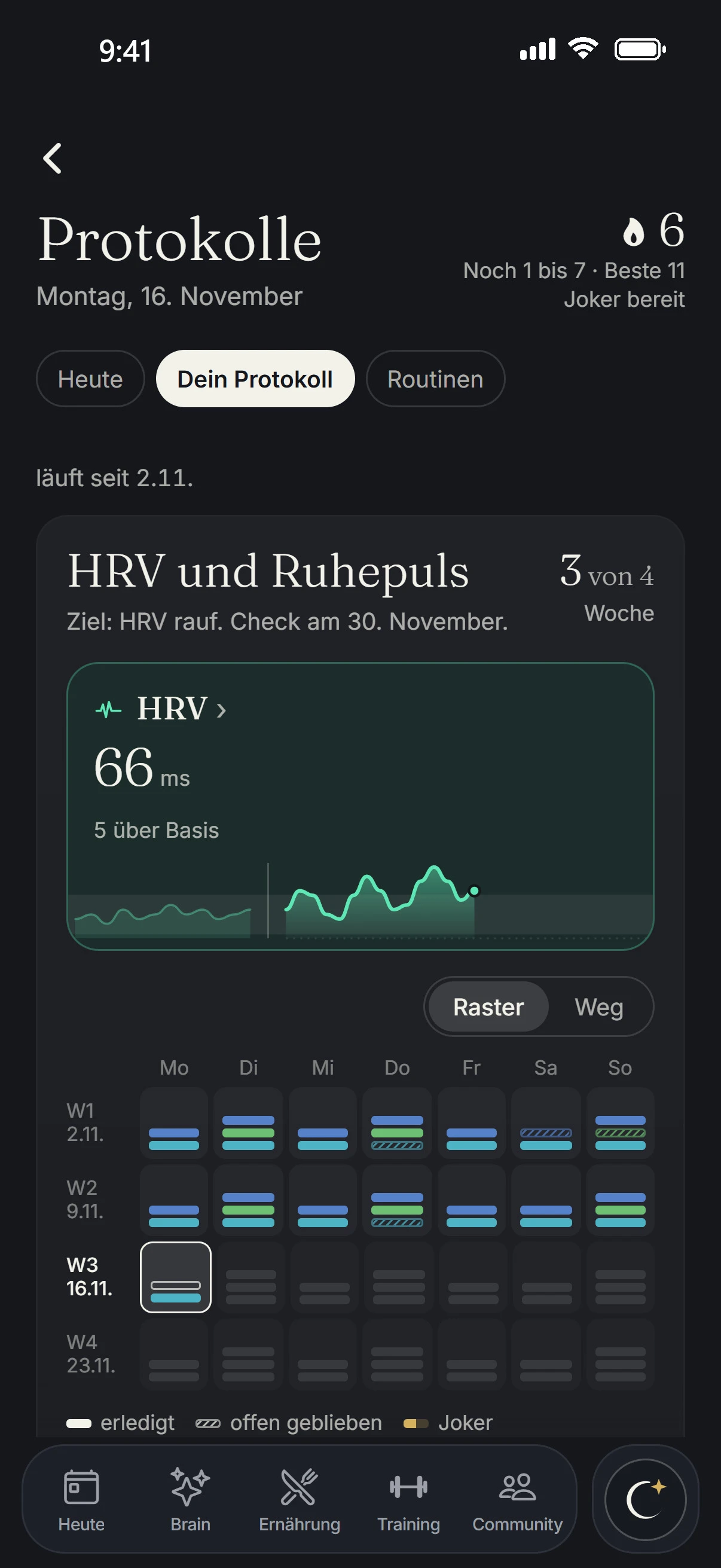
  • Each goal has its own page: your value against your baseline and the week you are in, for example “Week 3 of 4”.
A protocol in the app: streak 6, best 11, joker ready, HRV 66 ms, 5 above baseline, check on 30 November.
Thinking today in the app: Up to Evaluate, pyramid, summary and entry.
Last 14 days in the app: state and thinking for each day.
Observatory in the app: Your System, mind a bit more restless.
The Pattern page in the app: social media in November at least 17 h, 7 h less than in October, 8 evenings with friends, “After days over 2 h your head was more irritable the next day.”
A protocol in the app: streak 6, best 11, joker ready, HRV 66 ms, 5 above baseline, check on 30 November.
How Aellic calculates

Rate an evening yourself.

The same rules as under “Thinking today”. Pick an example entry and see which levels it reaches and what appears at the top.

Example entries

Activities and level

The entries are examples, rated by the same rules as in the app. Your own are in the Brain tab.

Thinking today

Up to Evaluate

Highest level today, sorted from your entry.

Create Evaluate Analyze Apply Understand Remember Consumed

Level of the day:
highest level among your activities

“Consumed” is not a level and never beats one.

Focus apps against your budget

Your state is made up of five parts. Focus apps have the largest share. How much of it counts depends on your budget, 90 minutes a day by default.

100%50%0% 04590 budget135180 min
83%of the focus-app share counts
Focus-app share:
up to 45 min (½ budget): 100%
at 90 min (budget): 50%
from 135 min (1.5 × budget): 0%

What your state is based on

Focus apps30%
Sleep25%
Recovery20%
Routines15%
Activity10%

Routines is the completion rate of your habits over the last 7 days. If a part is missing, Aellic spreads its weight over the others. The light part of focus apps is the full weight, the green part is what counts. Aellic shows the state as a word, never as a number. Example values.

How Aellic sorts it

  1. Up to eight activities. Aellic reads your evening entry and splits it into up to 8 activities.
  2. By demand. Each gets a level based on its mental demand, not on topic or duration.
  3. When in doubt, lower. If an activity fits two levels, Aellic takes the lower one.
  4. One sentence. A dry one-sentence summary comes with it.
  5. Dashed without an entry. Training or a completed routine counts as “Apply”, focus apps at or over the budget as “Consumed”.
  6. Up to three times. At most 3 assessments a day (“1 of 3 today”).
Evidence

Where the levels come from.

Every rule links to its source in the public register. Where there is none, it says so.

6Levels, from Remember to Create

The levels of thinking.

The six levels are Bloom’s revised taxonomy: Remember, Understand, Apply, Analyze, Evaluate, Create. Aellic adopts them in this order. “Consumed” is added as its own row below and is not a level.

2Axes for mood

Mood on two axes.

Your mood in the journal sits on two axes: how pleasant it is and how much energy you have. The model behind it comes from Russell's study.

Set by Aellic, no source.

These parts are rules set by Aellic. They are consistent in themselves, but cannot be derived from studies:

  • the rules by which Aellic assigns activities to a level
  • the two axes for mood in the journal, as Aellic implements them
  • the “Your System” card in Observatory
Questions

What people often ask.

I worked all day. Why does it only say “Up to Apply”?

Aellic sorts by the mental demand of an activity, not by topic or duration. If an activity fits two levels, the lower one counts. At the top is the highest level that any of your activities reached.

What does “Consumed” mean?

A row of its own below the pyramid, not a level. It never beats a level: if you consumed a lot and evaluated one thing, the top reads “Up to Evaluate”. If no activity reaches a level, the day is called “Consumption only”.

I didn't write anything down today.

Then Aellic estimates, shown dashed: training or a completed routine counts as “Apply”, focus apps at or over the budget as “Consumed”. Below it says “Dashed: estimated from training, routines and focus apps.”

Can I change my entry?

Yes. Under the entry you find “Edit” and “Delete”. Aellic assesses up to three times a day, and next to it you can see how many times already, for example “1 of 3 today”.

Why don't I see my state as a number?

Aellic shows it as a word: Clear, Alert, Steady, Irritable or Overstimulated. It is made up of focus apps (30%), sleep (25%), recovery (20%), routines (15%) and activity (10%). If a part is missing, the others are reweighted. Aellic does not show a number or thresholds.

All values on this page are example values.

Your data is stored on servers in Germany, and you can export and delete it. For Alphecca it goes to an AI service provider in the US, details in the privacy policy.

Aellic is available from age 14. At 14 and 15, a parent’s consent is required. Blood values from 18.